
The Tools I Use to Run My Online Shop
These are the tools behind my store’s funnels, emails and product videos, with what they do, what they cost and where they fall short.
Some links on this page are affiliate links. If you sign up, I may earn a commission at no extra cost to you.
Where Should You Start?
You don’t need every tool. Most small sellers only need these three:
Capture buyers’ emails
Make product videos
Add a voiceover
Too many tools is one of the main reasons small shops stall. Start with one, get it working, then add the next.
Build Your System

Systeme.io
What it does: Funnels, opt-in pages and email automation in one place.
Why I use it: I built my Starter Kit funnel and welcome emails in it. The free plan is enough to get going.
Create Your Content

InVideo
What it does: Turns product photos and a voiceover into short videos for TikTok, Reels and product pages.
Why I use it: It made a decent 35-second grater video from four photos. Watch the credits on the free plan, because the AI agent used all of mine checking its own work.
Generate AI Voiceovers

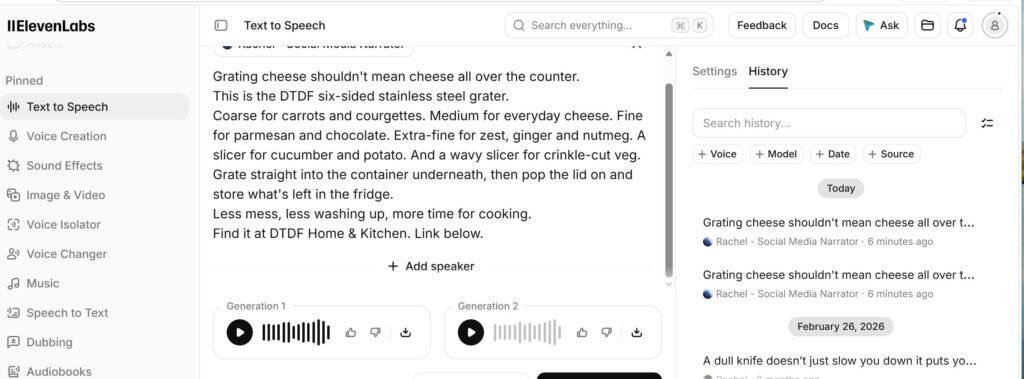
ElevenLabs
What it does: Realistic AI voiceovers from a written script.
Why I use it: Quick and cheap. Two takes of my grater voiceover took minutes and used about 500 characters of credit.
Make AI Product Videos

PixVerse
What it does: Turns one product photo into a short AI video for TikTok, Reels and Facebook.
Why I use it: I make my Roman-themed product episodes with it. The Standard plan gives 1,200 credits a month, enough for about 30 five-second clips. Read my PixVerse review.
Research Amazon Keywords

Helium 10
What it does: Amazon keyword research, rank checks and listing tools for sellers.
Why I use it: Its free tools showed my glass cup brush was stuck on page 5, so I rewrote my listings. The free plan is enough to start; paid plans begin at $99 a month billed annually.
Read more: my Helium 10 review · Helium 10 vs Jungle Scout
Tools on My Radar
I haven’t tried these yet, but they could be useful for a small online shop. I’ll only recommend them properly once I’ve tested them.
PDFs & Guides

Foxit PDF Editor
What it does: Create and edit PDFs, such as product guides, care instructions and printable order inserts.
Why it caught my eye: It could make simple guides and inserts for my shop quicker to put together.
Inbox & Customer Emails

SaneBox
What it does: Sorts your inbox automatically, so important emails don’t get buried.
Why it caught my eye:Keeping customer and order emails apart from everything else could save a lot of time.
Automation

Turbotic AI
What it does: Automates repetitive tasks so they run without you.
Why it caught my eye: It might take some routine shop admin off my hands.
How Everything Fits Together

Start With the Right Tools
Start with one tool, get it working in your shop, then add the next.