Helium 10 Free Plan Review 2026: I Tested It on My Own Amazon Listings
Disclosure: this Helium 10 free plan review contains affiliate links. If you sign up to Helium 10 through my link, I may earn a commission at no extra cost to you. I only used the free tools for this review and I paid nothing to Helium 10.
Most Helium 10 reviews are written by people testing the paid Diamond plan on products they don’t sell. This one is different. I run a small Amazon UK shop, DTDF Home & Kitchen, selling a glass cup brush, knife sharpeners, a vegetable peeler, a grater and silicone cupcake cases. I opened a free Helium 10 account, ran the free tools on my own listings, and then used what I found to fix them.
So this Helium 10 free plan review answers one simple question: if you’re a small seller who isn’t ready to pay $99+ a month, can Helium 10’s free tools actually help you? Here’s what I found, with real screenshots and real numbers from my own shop.
Helium 10 free plan review: quick verdict
| Question | My answer |
|---|---|
| Is the Helium 10 free plan worth signing up for? | Yes, it’s free and it showed me problems I didn’t know I had |
| Best free feature | The reverse ASIN check, which shows where your listing ranks for each keyword |
| Biggest limitation | Most search volumes are blurred, and Cerebro inside the app is demo-only |
| Who should upgrade? | Sellers with several products already making regular sales |
| Who should stay free? | Beginners, and anyone with one to five products |
What is Helium 10?
Helium 10 is a set of software tools for Amazon sellers. It helps you find keywords, check where your products rank, research new products, write better listings, manage Amazon ads and spot problems with your account. It’s one of the best-known tools in the Amazon seller world, alongside Jungle Scout.
The tools you’ll hear about most are:
- Magnet, which finds keyword ideas from a starting word, such as “knife sharpener”.
- Cerebro, a “reverse ASIN” tool. You paste in any product’s ASIN and it shows the keywords that product ranks for.
- Keyword Tracker, which tracks your ranking for chosen keywords every day.
- Listing Builder, which helps you write titles and bullet points that include your keywords.
- Black Box and Xray, which help you research product ideas and estimate competitors’ sales.
- Adtomic, for managing Amazon PPC ads.
Most of these are paid. The question for this review was what you can still do for £0.
Why I tested Helium 10 on my own shop
My Amazon listings were getting a few sales, but I had no idea how people were finding them, or whether they were finding them at all. I’d written the titles and bullet points myself, guessing what buyers might type into Amazon. I wanted real data, but I didn’t want to spend $99–$129 a month to get it.
So I signed up for a free Helium 10 account and ran two tests:
- Keyword research for one product (a chainmail cast iron scrubber).
- A reverse ASIN check on a live listing (my glass cup brush) to see where it actually ranks.
What the Helium 10 free plan actually gives you
Here’s what I could use without paying, as of October 2026:
- The free Amazon keyword tool on Helium 10’s website. It’s a limited version of Magnet. You type a keyword or paste an ASIN, pick your marketplace (it covers Amazon UK, which matters for UK sellers) and it returns a short report.
- A reverse ASIN lookup in the same tool. Paste your own ASIN and you see the keywords your listing is found for, plus its organic rank for each one.
- A Cerebro demo inside your account. When I logged in, Cerebro showed a banner saying I was viewing a demo. I could only click the preset example searches, not my own products.
- The Chrome extension, with limited access on the free plan.
The free keyword tool is the part that’s genuinely useful. Here’s what it showed me.
Test 1: keyword research for a chainmail scrubber
I searched “chainmail scrubber” with the marketplace set to amazon.co.uk. Helium 10 returned 17 related keywords. Only one had an exact search volume on the free plan. The others showed as bars, which give a rough idea of how popular each search is.
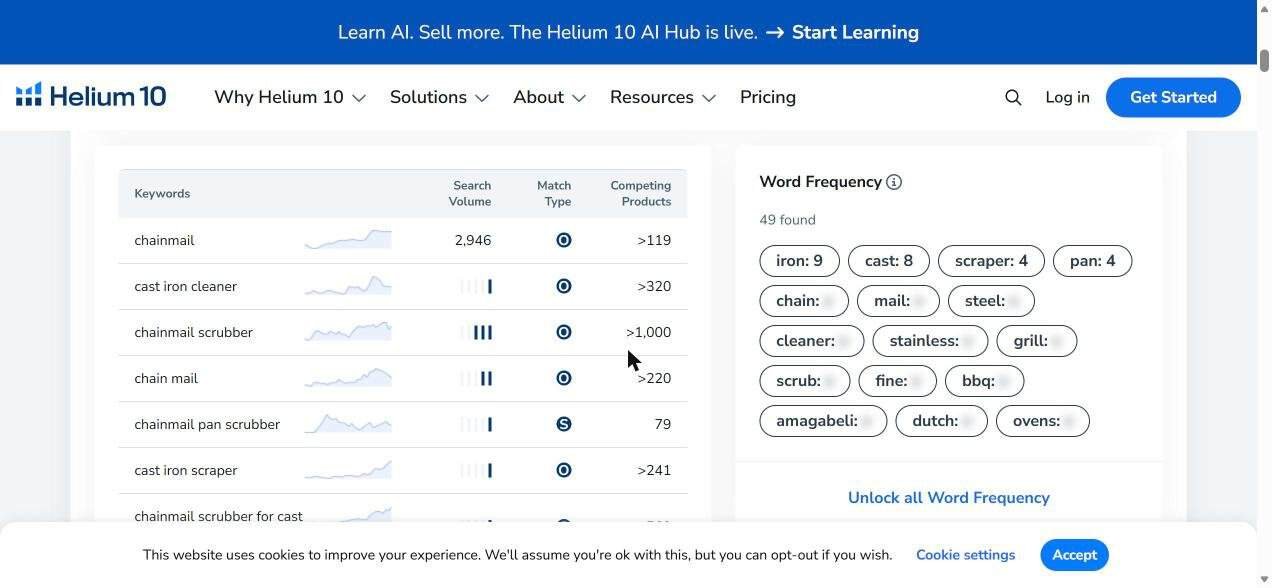
| Keyword | Monthly searches (UK) | Competing products |
|---|---|---|
| chainmail | 2,946 | >119 |
| chainmail scrubber | High (3 of 4 bars) | >1,000 |
| chain mail scrubber | Hidden | >2,000 |
| chainmail scrubber for cast iron pan | Low | 563 |
| chainmail pan scrubber | Low | 79 |
What this taught me:
- Buyers spell it two ways, “chainmail” and “chain mail”. Amazon treats them as different words, so a good title needs both.
- Long-tail keywords are much easier to win. “Chainmail pan scrubber” has only 79 competing products, compared with over 1,000 for “chainmail scrubber”. That’s where a new listing should start.
- A competitor’s brand name showed up in the word-frequency list. That told me which brand shoppers already know, which is useful for research. You must never put another brand’s name in your own listing, though.
Test 2: reverse ASIN check on my glass cup brush
This was the eye-opener. I pasted the ASIN of my glass cup brush (a brush with a suction base that sits in the sink) into the free tool. It found 54 keywords my listing was ranking for, which sounds great until you look at the positions.
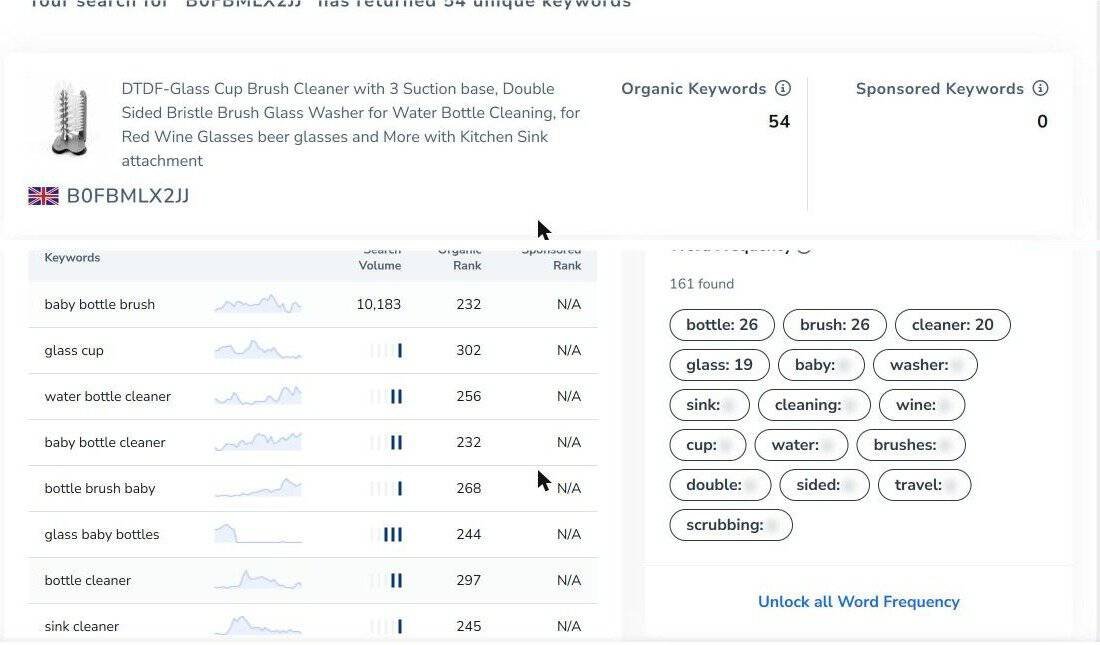
| Keyword | Monthly searches | My organic rank |
|---|---|---|
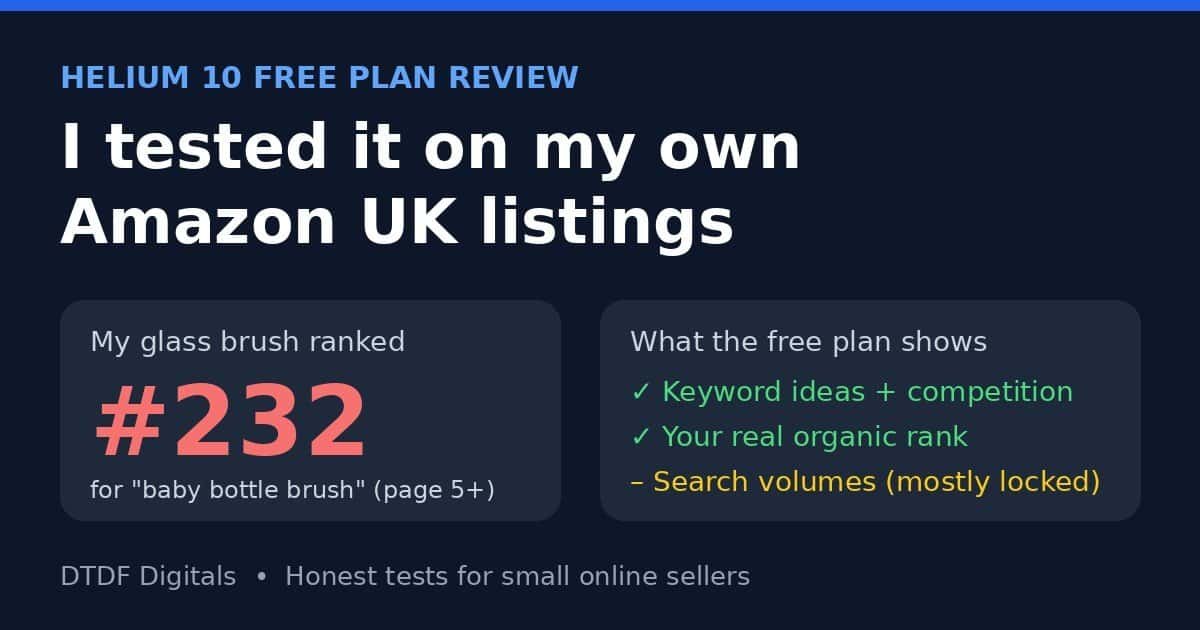
| baby bottle brush | 10,183 | 232 |
| water bottle cleaner | Medium | 256 |
| bottle cleaner | Medium | 297 |
| bottle washer | Low | 283 |
| glass cup | Low | 302 |
A rank of 232 means page 5 or later. Almost nobody scrolls that far on Amazon. So Amazon knew what my product was, but it wasn’t showing it to shoppers. The tool also showed 0 sponsored keywords, meaning I had no ads running to push the listing up.
A separate keyword search showed that “bottle brush” gets 33,903 searches a month in the UK. My title didn’t contain that exact phrase anywhere.
What I changed using the free data
Here’s exactly what I did to the glass cup brush listing after the check:
- A new title that includes the exact phrases people search: “DTDF Glass Cup Washer with 3 Suction Base, Double Sided Bottle Brush Cleaner for Kitchen Sink – Cleans Wine & Beer Glasses, Water & Baby Bottles, Travel Mugs”.
- Five new bullet points, each built around one keyword (“bottle brush”, “glass washer”, “kitchen sink brush” and so on) while keeping every claim accurate.
- New backend search terms, the hidden keywords only Amazon sees. The field had been empty.
- A category fix. The check made me look closer, and the brush was sitting in Grocery instead of Home & Kitchen. I moved it.
- A small automatic Sponsored Products ad at £4 a day, with a “dynamic bids – down only” strategy so costs can’t jump.
Then I did the same audit across my other listings, using Amazon’s own search suggestions alongside the Helium 10 data. I found problems I’d never have spotted otherwise:
- One knife sharpener listing had the product description for my vegetable peeler pasted into it by mistake.
- One title repeated “Knife Sharpener” three times.
- One bullet point had half a sentence pasted in the middle of it.
- Several listings used emojis in the bullet points, which Amazon’s style rules don’t allow.
To be fair, Helium 10 didn’t find those mistakes directly. But checking where I ranked made me look properly at every listing, and that’s where they turned up.
A lesson I didn’t expect: Brand Registry
Two of my title changes were rejected with Amazon error 8541. Amazon told me that changing the main catalogue title of a branded product requires Amazon Brand Registry, and that needs a registered (or, in the UK, possibly pending) trademark. Bullet points, search terms and descriptions still went through. If you’re starting out, register your brand name as a trademark early. It costs £205 for one class at the UK IPO, plus £60 for each extra class.
What’s locked on the Helium 10 free plan
This is where the free plan runs out, and I want to be honest about it:
- Most search volumes are blurred. You get one or two exact numbers per search. The rest are bars.
- Results are cut short. My reverse ASIN check found 54 keywords but only showed the top 10. The rest were hidden placeholders.
- Cerebro inside the app is a demo. You can’t run it on your own ASINs or your competitors’.
- Keyword Tracker is paid. This is the tool I’d most like, because it would show whether my changes are moving me up the rankings day by day.
- Listing Builder, Adtomic (ads), Alerts and Follow-Up (automatic review requests) are paid.
Helium 10 pricing in 2026
If you do want the paid tools, these are the prices listed on Helium 10’s pricing page in October 2026 (in US dollars):
| Plan | Billed monthly | Billed annually |
|---|---|---|
| Free | $0 | $0 |
| Platinum | $129/month | $99/month |
| Diamond | $359/month | $279/month |
| Enterprise | From $1,499/month | Billed annually |
Monthly plans can be cancelled at any time, but they renew automatically, so set a reminder if you’re only testing. Prices change, so check the pricing page before you buy.
Is a paid plan worth it for a small seller? Here’s a quick reality check with my own numbers. My knife sharpener sells for £6.90 and leaves about £2.57 profit before ads. To cover Platinum at $99 a month (roughly £75), I’d need about 29 extra sales a month just to break even on the software. For a shop my size, that doesn’t add up yet. For a seller doing hundreds of sales a month across many products, it easily could.
Thinking about a cheaper option? I compared prices and features side by side in Helium 10 vs Jungle Scout.
Pros and cons
Pros
- It’s free: I paid nothing for any of the tools in this review.
- It supports Amazon UK, not just the US.
- The reverse ASIN check shows your real organic rank, which most beginners have never seen.
- You get enough keyword ideas to rewrite a title and bullet points properly.
- It shows how many products compete for each keyword, so you can pick easier ones.
Cons
- Most search volumes are hidden behind the paid plan.
- Only the top 10 results are shown.
- Cerebro in the app is demo-only.
- There’s no daily rank tracking for free.
- Paid plans are expensive for very small shops.
Who should use the free plan, and who should pay?
Stay on the free plan if:
- You have one to five products.
- You’re making fewer than about 100 sales a month.
- You mainly need keyword ideas to fix your titles and bullet points.
Consider Platinum if:
- You’re launching new products regularly and need full keyword data.
- You want daily rank tracking to prove your changes work.
- Your monthly profit comfortably covers $99–$129.
Free tip: combine Helium 10 with Amazon’s own search suggestions
When Helium 10 blurs a search volume, there’s a free workaround. Start typing your product into Amazon’s search bar and look at the suggestions that drop down. Amazon shows the most popular searches first. For my knife sharpener, typing “knife sharpener” suggested “knife sharpener uk”, “knife sharpeners for kitchen knives” and “knife sharpener professional”, all phrases real buyers use. Put the two together and you have a solid keyword list for £0.
My results so far: Helium 10 free plan review update
I made these changes on 15 October 2026, and Amazon can take a couple of weeks to re-rank a listing. I’ll update this section with my glass cup brush’s new rankings and ad results after my two-week check, so you’ll see whether the free data actually moved the needle.
Before: glass cup brush ranked between 232 and 302 for its main keywords. Knife sharpener: not in the top 240 for “knife sharpener”.
After: update coming soon.
FAQs
Is Helium 10 really free?
Yes, there is a free plan. It gives limited access to some tools, such as the free keyword tool, a reverse ASIN lookup and a Cerebro demo. Full tools like Keyword Tracker and complete Cerebro need a paid plan.
Does Helium 10 work for Amazon UK?
Yes. The free keyword tool lets you choose amazon.co.uk, and that’s the marketplace I used for every test in this review.
What’s the best free Helium 10 tool for beginners?
The reverse ASIN lookup. Paste in your own ASIN and you’ll see which keywords Amazon links your product to, and how far down the results you really are.
How much is Helium 10 per month?
In October 2026, Platinum is $129 a month (or $99 a month billed annually) and Diamond is $359 a month (or $279 a month billed annually). The free plan costs nothing.
Is Helium 10 worth it for small sellers?
The free plan is worth it for everyone. Paid plans make sense once your monthly profit can comfortably cover the cost. For a small shop, start free, fix your listings, and upgrade later if you need daily tracking.
Helium 10 free plan review: my final verdict
The Helium 10 free plan won’t do everything, but it did the most important thing for my shop: it showed me that my listings were invisible. A rank of 232 isn’t something you can see by looking at your own product page. Once I knew, I could fix the titles, bullets, search terms and category in one evening, without spending a penny on software.
If you sell on Amazon and you’ve never checked where your listings actually rank, start with the free plan. It takes about five minutes. I’ll keep updating this Helium 10 free plan review as my rankings change.
Want more tools like this? See my recommended tools for online sellers, read my PixVerse review to see how I make product videos with AI, or grab the free Seller Starter Kit.