HeyGen Review (2026): I Tested the Free Plan on My Own Product
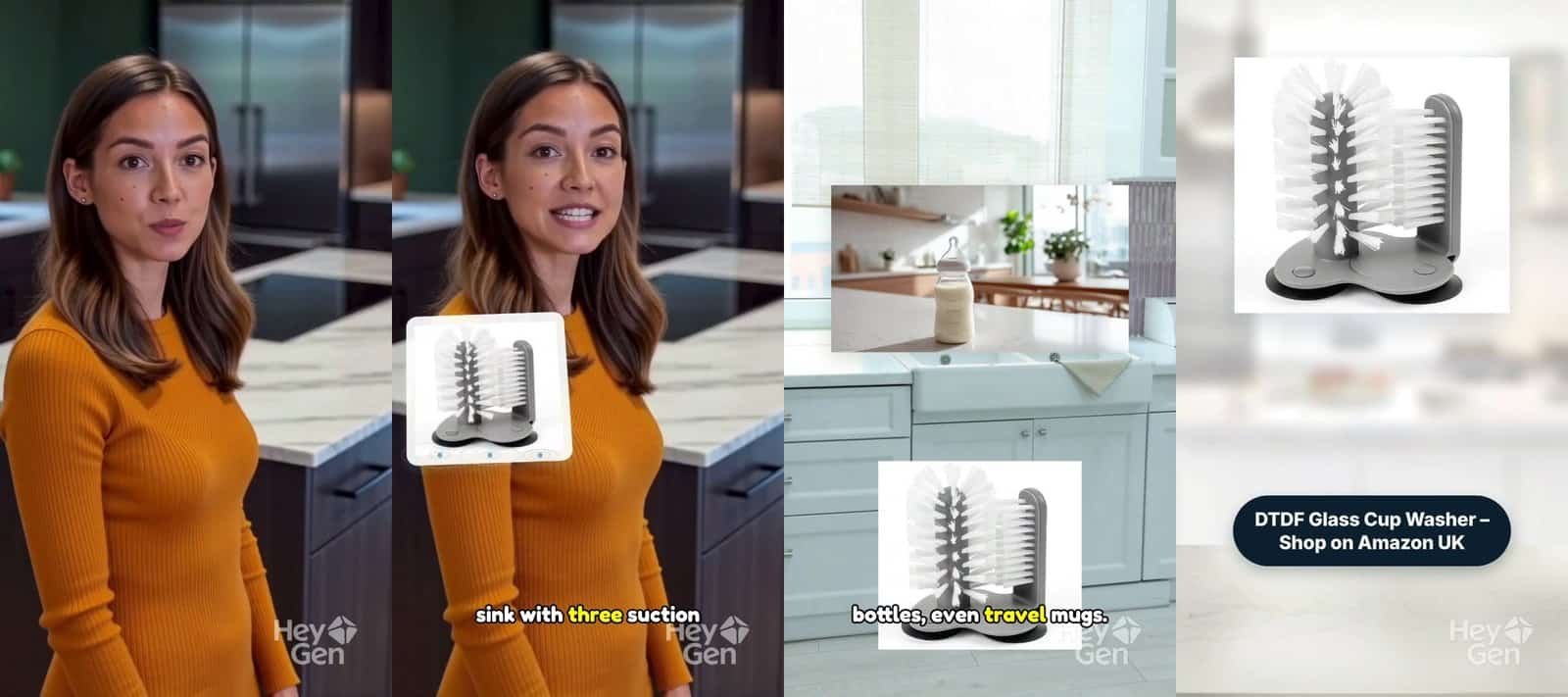
HeyGen is one of the most popular AI avatar tools around, so I wanted to know if the free plan is actually useful for a small online seller. In this HeyGen review, I tested the free plan on my own product from my Amazon UK shop: the DTDF Glass Cup Washer, a double-sided brush that suctions to the sink.
I made a 30-second vertical ad with a ready-made AI presenter, using HeyGen’s Video Agent. Here’s exactly what the free plan made, what it costs, and who it suits.
Disclosure: I have no affiliate link with HeyGen at the time of writing. Some other links on this page are affiliate links, which doesn’t change what I recommend.
HeyGen review: quick verdict
| Best for | A talking AI presenter that introduces your product |
| Free plan | Yes: 3 videos a month, up to 1 minute, 720p, watermarked |
| Paid from | Creator £21/month (Pro £37/month) |
| Download on free? | Yes, with burned-in captions |
| Product accuracy | Excellent: it uses your real product photo |
| Shows product in use? | No: the product appears as a photo, not demonstrated |
| My rating | 4/5 for presenter videos |
What is HeyGen?
HeyGen turns a script into a video with an AI presenter, called an avatar. You can choose from more than 500 ready-made presenters, or record yourself for about 15 seconds to create your own avatar. It also translates videos into 30+ languages on the free plan.
Its Video Agent works like a creative assistant. You describe the video, attach a product photo and paste a script, and it plans the scenes for you.
How I tested HeyGen for this review
For this HeyGen review, I signed up for the free plan with my business email and no card. I skipped creating my own avatar, picked a ready-made presenter called Marieke, chose a British voice, and uploaded my main Amazon product photo.
Then I gave the Video Agent a word-for-word script and asked for a 30-second portrait video for TikTok and Instagram Reels. I chose Plan mode, so it showed me the plan before making anything. That matters on a plan with only 3 videos a month.
HeyGen review: what the free plan made
About 8 minutes after I approved the plan, I had a 29-second, 720p vertical video. Marieke introduced the product, with my product photo cut in as close-ups and placed into kitchen scenes. It finished on my end card: “DTDF Glass Cup Washer – Shop on Amazon UK”.
What worked well
- My product was 100% accurate. HeyGen used my real photo instead of redrawing the product, so the white bristles, grey suction base and shape were exactly right. No misspelt brand and no other company’s logo.
- The presenter looked and sounded natural. The lip sync matched, the British voice fitted, and she said “DTDF” perfectly.
- It followed my script word for word.
- Plan mode let me check everything first: the script, then the presenter and format, then generate.
- I could download it free, with burned-in captions. Some tools I’ve tested lock downloads until you pay.
What could be better
- Nobody actually uses the product. When Marieke says “push your glass down and twist”, the screen just shows my product photo. You never see it working.
- Extra items appear as separate pictures. The wine glass, bottle and baby bottle were shown in their own images, not with my product.
- The watermark is large and overlaps the captions, which are quite small.
- It picked a different presenter at first. I had chosen Marieke, but the agent suggested someone else until I told it to use her.
- “Create new video” is locked on the home screen until you clone yourself. I had to go through the Video Agent app instead.
HeyGen pricing (UK)
| Plan | Price | What you get |
|---|---|---|
| Free | £0 | 3 watermarked videos a month, up to 1 minute each, Avatar IV and Video Agent, one custom avatar, 500+ presenters, 30+ languages |
| Creator | £21/month | No watermark, more advanced avatars, Video Agent with more access, HeyGen Voice, 600 credits |
| Pro | £37/month | 1,000 credits, 4K export, Seedance 2.5 video model and other Pro features |
Prices are from HeyGen’s sign-up page in October 2026. Annual billing gives 2 months free. AI tools change prices often, so check before you buy.
HeyGen vs other AI video tools I’ve tested
Every tool has a different strength. HeyGen gets your product exactly right because it doesn’t change your photo, but it doesn’t show the product in use. Tools that rebuild your product with AI can show it working, but they sometimes get details wrong.
| Tool | Product shown in use? | Product accuracy | Free download? |
|---|---|---|---|
| HeyGen | No, photo only | Excellent | Yes, watermarked |
| AdsTurbo | Yes | Mixed: wrong brand spelling, extra logo | No |
| Creatify | Yes (paid) | Very good | Free plan too small |
| Colossyan | No, presenter | Not applicable | Yes, watermarked |
See all the results in my AI video tools comparison, or read Creatify vs Colossyan. If you want to know why AI tools change your product, read why AI gets your product wrong.
Who HeyGen is best for
- Sellers who want a friendly presenter to introduce or explain a product
- Anyone worried about AI changing their product, since HeyGen keeps your photo as it is
- Sellers who want to try for free and actually download the result
- Brands that want videos in other languages
It’s less suited to sellers who need to show the product working. For that, a product-ad tool like Creatify or real footage from your phone works better.
Tips if you try HeyGen
- Use Plan mode, not Auto-pilot, so you don’t waste one of your 3 free videos.
- Write your script word for word and say so in the prompt.
- If the agent picks a different presenter, tell it which one to use before you generate.
- Upload a clear product photo on a white background. HeyGen shows it exactly as it is.
- Keep burned-in captions on when you download, since most people watch without sound.
FAQs
Is HeyGen free?
Yes. The free plan gives you 3 videos a month, up to 1 minute each, at 720p with a HeyGen watermark. You don’t need a card to sign up.
Can you download HeyGen videos on the free plan?
Yes. I downloaded my free video as an MP4, with the option to burn in captions. It includes the HeyGen watermark.
Do I need to create my own avatar?
No. You can use one of the 500+ ready-made presenters through the Video Agent. The home screen pushes you to clone yourself first, but the Video Agent works without it.
Is HeyGen good for product videos?
It’s good for a presenter talking about your product, and it keeps your product photo accurate. It doesn’t show the product being used, so for demos I’d choose a product-ad tool or real footage.
HeyGen review: final verdict
Overall, this HeyGen review comes out positive: the free plan is one of the most useful I’ve tested. You can make a real, downloadable presenter video in minutes, and it won’t change your product. The watermark and the lack of a real product demo are the main limits.
If you want a friendly face to introduce your products, HeyGen is well worth trying free. If you need to show your product working, pair it with real footage or a product-ad tool.

Dave is the founder of DTDF Digitals and the owner of DTDF Home & Kitchen, a UK kitchenware brand that has sold over 500 products on its own store and Amazon. He also runs Smart Refurbish, a listing makeover service that gives small Amazon and eBay sellers’ tired listings a second life. He tests AI video, ad and seller tools on his own real products before reviewing them, and shares what each tool produced, what it cost and where it fell short.