Systeme.io Review: Months on the Free Plan, Then I Upgraded
The email I was proudest of had a 0% open rate. Four newsletters, sent to six people, and not one of them was opened. That was early in my time with Systeme.io, and it’s where this review starts, because it taught me more than any tutorial did. This week I tore the whole thing down and rebuilt it: a new opt-in page, a new download page and a seven-email sequence for my seller starter kit. My welcome sequence has been opening at 83 to 100%.
I ran my funnel on the Systeme.io free plan for months before I paid a penny. I now pay $17 a month for the Startup plan, because I’d outgrown the free plan’s three funnels and its single automation rule. So this Systeme.io review covers both sides: what the free plan actually lets a small online seller do, and what changes when you pay. I’ll show you what I built, the numbers it produced, and the things that drove me up the wall.
Quick verdict: for a small online seller who wants an opt-in page, a download page and automatic follow-up emails in one place, Systeme.io is the best value I’ve used. Start on the free plan, which carried my funnel for months, and only upgrade when you hit a real limit. It isn’t the prettiest editor and the menus take some learning, but you can get a working email funnel live in an afternoon.
Disclosure: some links in this Systeme.io review are affiliate links. If you sign up through them I may earn a commission at no extra cost to you. I use Systeme.io for my own shop, and I’ve included the parts I don’t like.
Systeme.io review basics: what it is and why a shop owner would care
Systeme.io is an all-in-one marketing platform. In one account you get landing pages, sales funnels, email marketing, automations, online courses and even a simple blog. The pitch is that you stop paying for five separate tools and stitch nothing together yourself.
I’m Dave, and I run DTDF Home & Kitchen. I’ve sold over 500 products through my own store and on Amazon, and the hardest lesson I learned is that a one-time buyer usually stays a one-time buyer unless you have a way to talk to them again. Social media reach comes and goes. An email list is the one channel you actually own. I needed somewhere to collect emails and send follow-ups automatically, and I didn’t want a monthly bill for it while my list was still tiny.
That’s the gap Systeme.io fills for small sellers. You’re not buying it to run a huge marketing department. You’re buying, or rather not buying, a simple email funnel for small business that keeps working while you pack orders.
What I built for this Systeme.io review (and how long it took)
The funnel has three parts, and together they took me one afternoon to rebuild from the old version.
1. The opt-in page
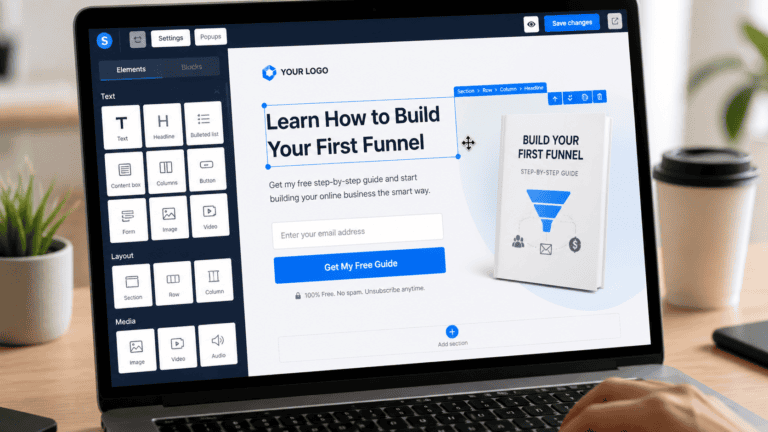
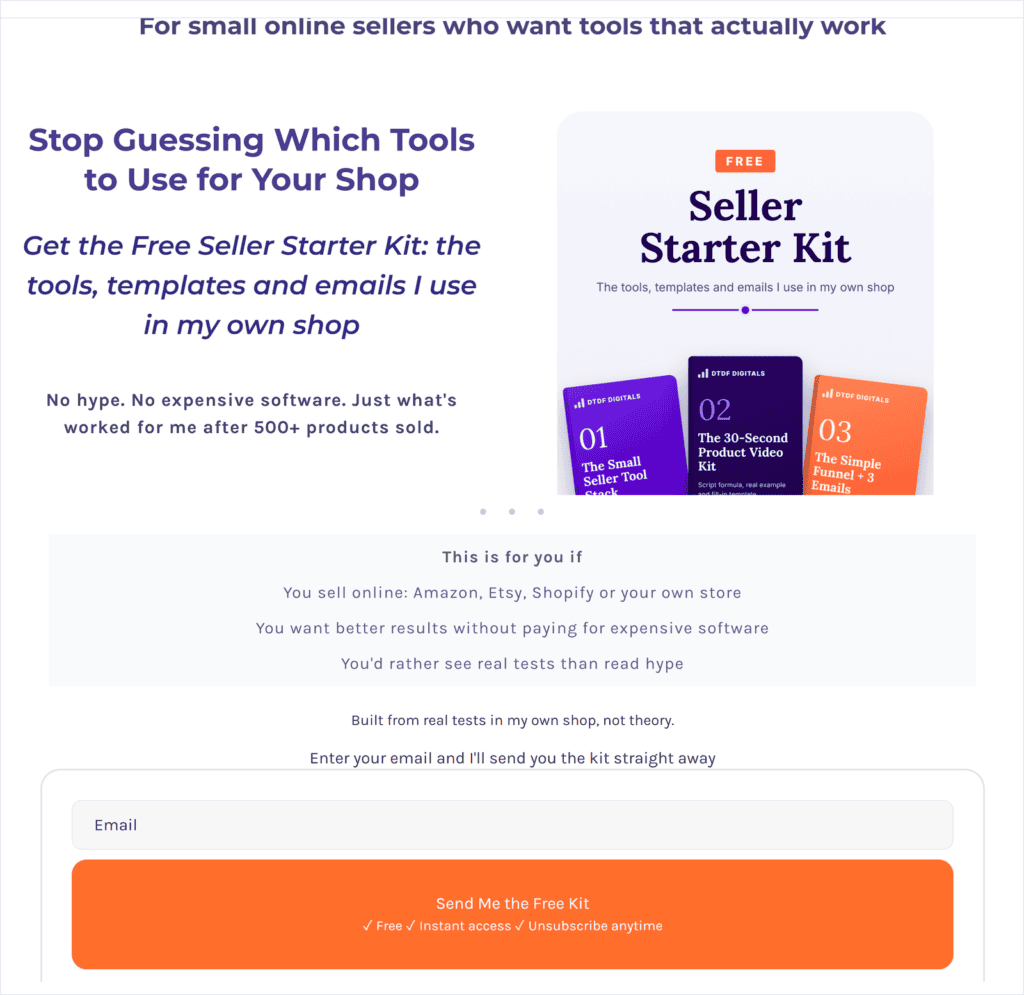
This is where someone swaps their email for my free Seller Starter Kit. I kept it simple: one headline, a short line about who I am, four bullet points saying what’s inside, an image of the kit, and one orange button. Systeme.io’s editor works by dragging blocks onto the page, and every block has its own settings for spacing, fonts and colours. There’s a separate phone view, which matters, because on mobile my text was squashed together until I added margin to each block in that view. Changes you make in phone view only affect phones, so your desktop layout stays as it is.
2. The thank-you and download page
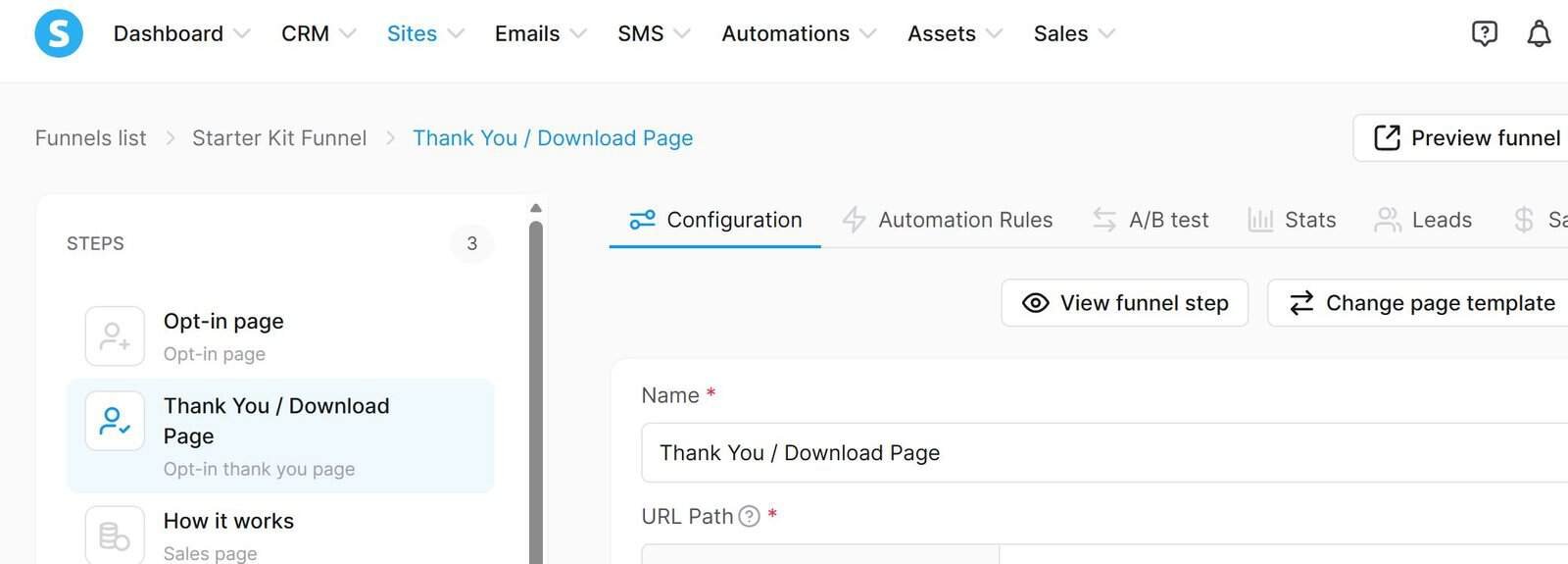
After someone signs up they land here. The old version had three separate download buttons for three bonuses. I cut it to one button set to Download file, uploaded the new PDF straight onto the button, and added one line pointing to Systeme.io for anyone who wants to build the same thing. No hosting, no Google Drive links, no fuss.
3. The automation rule and seven-email campaign
This is the part that makes it a funnel rather than a form. On the opt-in step there’s an automation rule: when someone subscribes through the form, Systeme.io adds a tag called starter-kit and subscribes them to a campaign called Starter Kit delivery. That campaign is my seven-email sequence, one a day for a week. Email one delivers the kit, email two shares the rule I use before paying for any tool, email three tells the story of my AI product video, and so on, ending with a question asking what job eats the most time in their shop.
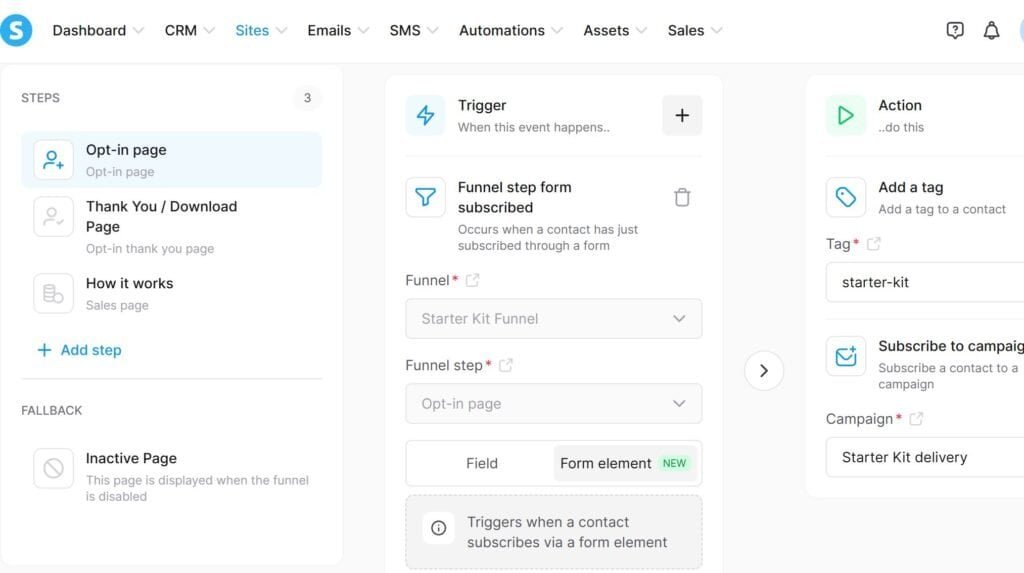
The whole thing runs on its own now. I don’t press send on anything. Someone signs up at 2am, gets the kit instantly, and receives the next six emails on schedule.
Systeme.io review results: 90% opens, and the 0% lesson
I want to be upfront that my list is small. These are early numbers from a handful of people, not a big marketing case study. But they’re real, and they show something useful.
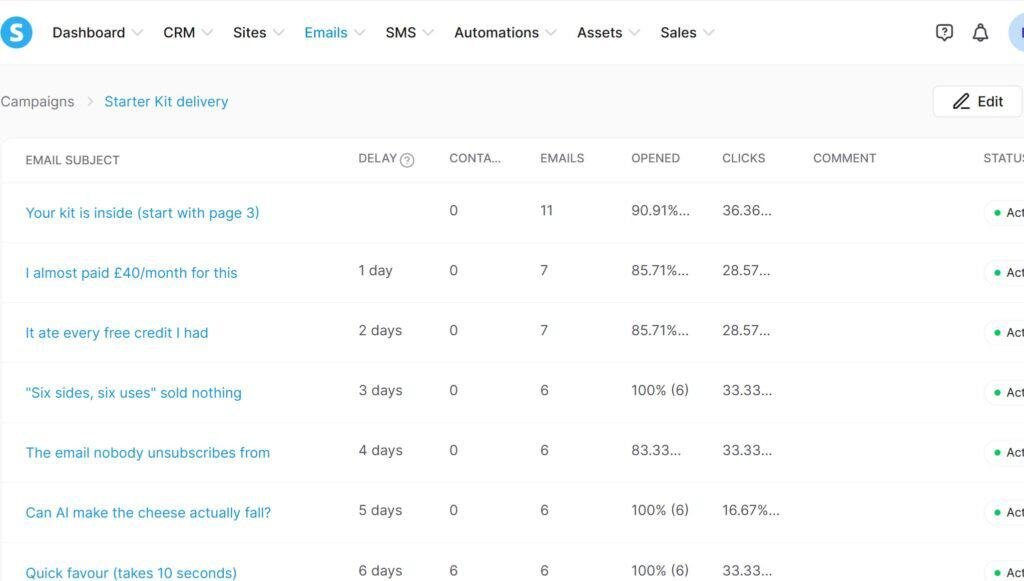
The sequence emails have been opening at 83 to 100%. I’ve just rewritten the subject lines to be more curiosity-led, so I’ll update these numbers as new subscribers come through. My four old newsletters, sent months earlier, opened at exactly zero. Same tool, same sender, very different results. So what changed?
The difference is who received them. The sequence goes to people who asked for something a minute ago, so they’re expecting my email and they open it. The newsletters went to an old list of leads who’d forgotten who I was. Systeme.io delivered both just fine. The lesson is that email marketing for online sellers works when the email arrives while the person still cares, which is exactly what an automated sequence does and a monthly newsletter to a cold list doesn’t.
Systeme.io pricing: what I pay and what you get
For this Systeme.io review, I’m on the Startup plan, which costs me $17 a month. Here’s what each paid plan includes, taken straight from the My plan page in my own account, with my current usage on Startup in brackets.
| Startup | Webinar | Unlimited | |
|---|---|---|---|
| Price | $17/month | $47/month | $97/month |
| Contacts | 5,000 (I use 6) | 10,000 | Unlimited |
| Sales funnels | 10 (I use 3) | 50 | Unlimited |
| Funnel steps | 50 (I use 6) | 300 | Unlimited |
| Automation rules | 10 (I use 2) | 100 | Unlimited |
| Blogs | 5 | 20 | Unlimited |
| Courses | 5 | 20 | Unlimited |
| Link in bio pages | 3 | 10 | Unlimited |
Paying yearly instead of monthly gets you two months free. Prices are in US dollars and can change, so check the pricing page on the day you sign up.
There’s also a free plan, and it’s where I started. It gives you 2,000 contacts, 3 sales funnels, 1 automation rule and 1 email campaign, with no time limit. You could build everything in this Systeme.io review on it, as long as you only need one funnel and one sequence.
Looking at my own numbers, I’m nowhere near the Startup limits yet: 6 contacts out of 5,000 and 3 funnels out of 10. If you’re just starting out, I’d begin on the free plan and only upgrade when you actually hit a limit. That’s the honest advice, even though I’m paying.
Why I upgraded from the free plan
The free plan carried my shop for months, so I didn’t upgrade on a whim. Three limits pushed me, and if you hit the same ones, that’s your sign too.
1. I needed more than three funnels
The free plan lets you build 3 sales funnels. Startup gives you 10. That sounds like plenty until you want to try something new and have to delete an old funnel to make room. I want one funnel for the Seller Starter Kit and separate ones for the digital products I plan to launch, without tearing anything down. More funnels means I can test different offers and reach different kinds of sellers, and that’s how a small shop builds extra income streams instead of relying on one.
2. One automation rule wasn’t enough
This was the big one. The free plan gives you 1 automation rule and 1 email campaign. Startup raises both to 10. With only one of each, you can welcome new subscribers and that’s about it. With ten, you can build a proper customer journey: someone downloads a free resource and gets a welcome email straight away, follow-up emails introduce a product over the next few days, and buyers receive relevant offers after they purchase. All of it runs while I’m packing orders or busy with everything else in life, and that’s exactly what I need as a one-person business.
3. Room to grow beyond social media
The free plan holds 2,000 contacts; Startup holds 5,000. I’m nowhere near either yet, but I’d rather build on a plan with headroom than hit a wall the month things take off. Startup also gives you more room for websites, products and marketing campaigns. The bigger point for me is independence: social media reach comes and goes, but an email list is mine. I’m building a business that can grow beyond a single product or a single campaign, and the Startup plan is the cheapest way to give it that room.
Systeme.io review: what I liked
The biggest win is that everything lives in one place. My opt-in page, my download page, my contact list, my tags and my email sequence all sit in the same account and talk to each other without any plug-ins. When someone signs up, the tag and the campaign kick in automatically. With separate tools I’d be paying for a connector and hoping it didn’t break.
The free plan is genuinely usable, not a trial in disguise. I ran my live funnel on it for months, with real subscribers and automated emails, before I chose to upgrade. The Download file button is a small thing I loved too: attach the PDF and you’re done.
The campaign stats are clear. Every email shows how many people received it, opened it and clicked, right in the list, so you can see at a glance which subject lines are working. That’s how I spotted that my old newsletters were dead.
Systeme.io review: what annoyed me
The menus take time to learn. Newsletters and Campaigns sit side by side under Emails, and I opened the wrong one first and spent a few minutes looking at old one-off emails, wondering where my sequence had gone. Funnels live under Sites, automations live on the funnel step and also under Automations, and none of it is obvious on day one.
The page editor is fiddly on mobile. Spacing that looks fine on desktop can be squashed on a phone, and you have to switch to phone view and fix the margins block by block. It works, but it’s slow. I also had a bullet point turn itself into a purple link while I was typing, which I had to unlink by hand.
The templates are a bit dated. They do the job, but you’ll want to rewrite every word and swap the images to make the pages look like your brand. If you want something that looks like a polished Shopify theme out of the box, this isn’t it.
Systeme.io vs Mailchimp for small sellers
This is the comparison most sellers ask about, because Mailchimp is the name everyone knows. In this part of my Systeme.io review, I’m comparing them for one job: collecting emails and sending automatic follow-ups for a small shop.
| Systeme.io | Mailchimp | |
|---|---|---|
| Free plan contacts | Up to 2,000 | Much smaller free limit |
| Email sends on free plan | Unlimited | Capped each month |
| Landing and download pages | Built in, full funnel | Basic landing pages |
| Automated email sequences | On the free plan | Mostly on paid plans |
| Sell digital products or courses | Yes | No |
| Email design editor | Plain but works | More polished |
Mailchimp’s limits change often, so check its current free plan before deciding. In my experience, Mailchimp is the better pure email designer, and its emails look slicker. But for a small seller who needs the whole path, page to download to follow-up sequence, Systeme.io does more for free. I’d only choose Mailchimp if beautifully designed newsletters matter more to you than automation.
Who Systeme.io is for, and who should skip it
The short answer from this Systeme.io review: it’s a good fit if you sell online, through your own store, Etsy, Shopify or social media, and you want a free way to collect emails and follow up automatically. It also suits you if you want to sell a guide, a course or a digital product later without adding another tool.
Skip it if you mainly sell on Amazon and plan to email your Amazon buyers. Amazon’s rules restrict contacting buyers for marketing, so build your list from your own website and social media instead. Skip it too if you need a fully custom, designer-level website, or advanced ecommerce features like stock control. Systeme.io is a marketing tool, not a shop platform.
How to get started in one afternoon
If you want a full walkthrough with screenshots, read my guide on how to build a funnel with Systeme.io, no experience needed. Here’s the short version.
- Sign up for the free plan and add your sender name and email address.
- Create a funnel with the goal Build an audience. It gives you an opt-in page and a thank-you page.
- Write one clear headline, three bullet points and one button on the opt-in page. Check it in phone view.
- On the thank-you page, set the button to Download file and upload your freebie.
- On the opt-in step, add an automation rule: add a tag and subscribe the contact to a campaign.
- Write three to seven short emails in that campaign, one a day.
- Sign up yourself with a second email address and check every page and email works.
If you’d like a head start, my free Seller Starter Kit includes the exact funnel layout and three ready-to-copy emails. Get the Free Starter Kit
Systeme.io review FAQ
Is Systeme.io really free? Yes. The free plan has no time limit, and I used it for months before upgrading. It gives you 2,000 contacts, 3 funnels, 1 automation rule and 1 email campaign. You only pay when you need more contacts, funnels or automation rules; Startup is $17 a month.
Is Systeme.io worth it for a small online shop? For collecting emails and sending automatic follow-ups, yes. It does more on its free plan than most email tools do on their cheapest paid plan. If you need a full ecommerce store, use it alongside your shop rather than instead of it.
Is Systeme.io good for beginners? The basics are beginner-friendly, but expect an hour or two of clicking around before the menus make sense. Start with one simple funnel rather than trying everything at once.
Can I use my own domain? Yes, you can connect your own domain so your pages don’t sit on a Systeme.io address. My current funnel still uses the Systeme.io subdomain and works fine.
Will my emails go to spam? Mine are opening at 83 to 100%, so they’re reaching inboxes. Emails to old, cold contacts did much worse, so send to people who recently signed up and set up your domain authentication in the settings.
Systeme.io review verdict: is it worth it?
For a small seller, my Systeme.io review comes down to yes. I ran my funnel free for months, rebuilt it in an afternoon, and my welcome emails open at 83 to 100%. Now I pay $17 a month, and I’m still nowhere near the Startup limits. It’s not the slickest tool to learn and the mobile editing is slow, but nothing else I’ve tried gives you landing pages, downloads and automated email sequences together for free. Start on the free plan, build one simple funnel, and only upgrade when your list makes it worth paying for.