SellerSprite Case Study: My Cheese Grater Had 0 Keywords
My 6-in-1 cheese grater had been listed on Amazon UK for weeks and had zero page views. In this SellerSprite case study, I’ll show you why: it ranked for 0 keywords. Amazon wasn’t showing it to anyone.
This is the full case study: what SellerSprite found, what I changed on the listing and in my ads, and what it cost. It’s the same method from my SellerSprite tutorial, used on a second product.
Disclosure: SellerSprite gave me two months of their Standard plan, and I earn a commission if you subscribe with my code. The figures below are exactly what the tool showed me.
🎁 Reader offer: 35% off SellerSprite
Use code DTDFUK at checkout for 35% off SellerSprite subscriptions. The code must be entered at checkout for the discount to apply.
The problem: 0 keywords, 0 views
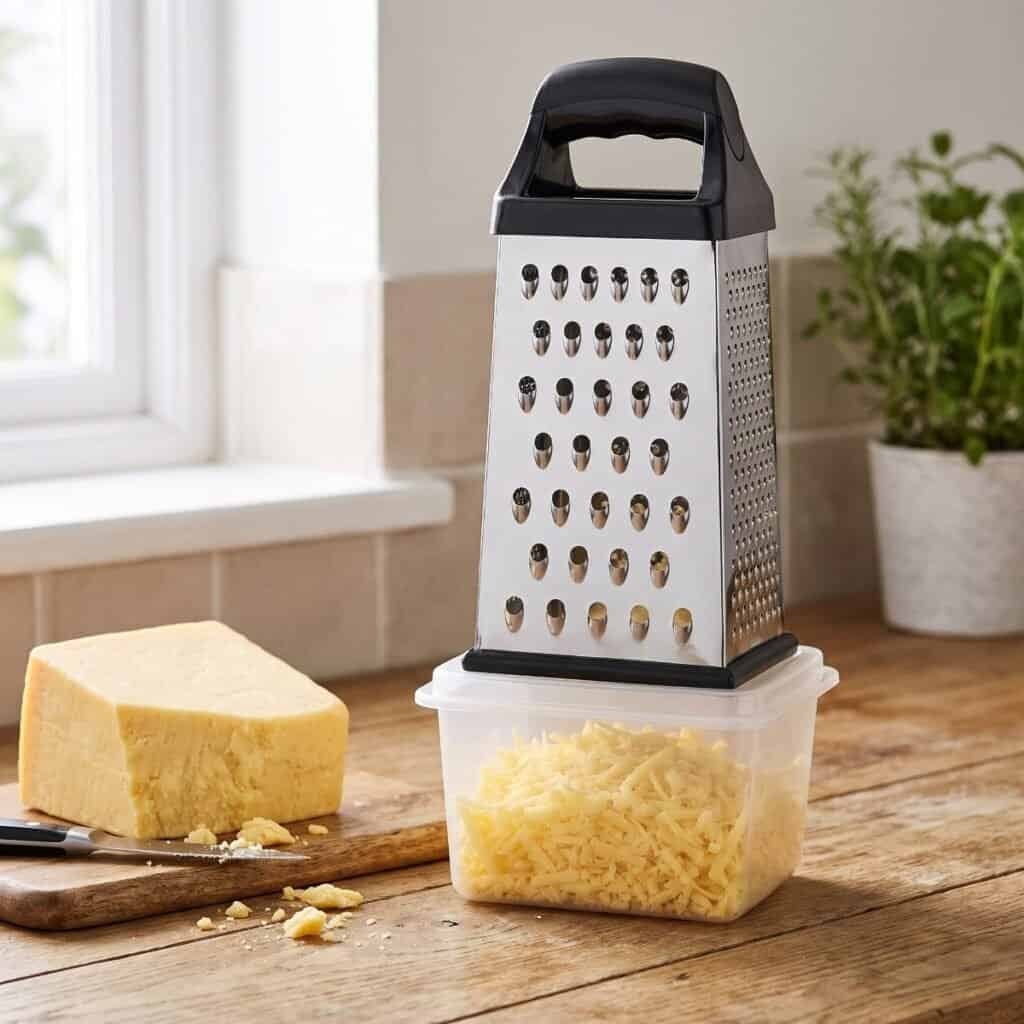
- Product: DTDF 6-in-1 Cheese Grater with Container, £10.99 on Amazon UK
- Reverse ASIN result: 0 keywords, no sales rank, no ratings
- Seller Central: 0 page views
A listing with no keywords is invisible. It doesn’t matter how good the product is if Amazon never puts it in front of a shopper.
Step 1: Find a competitor that’s winning
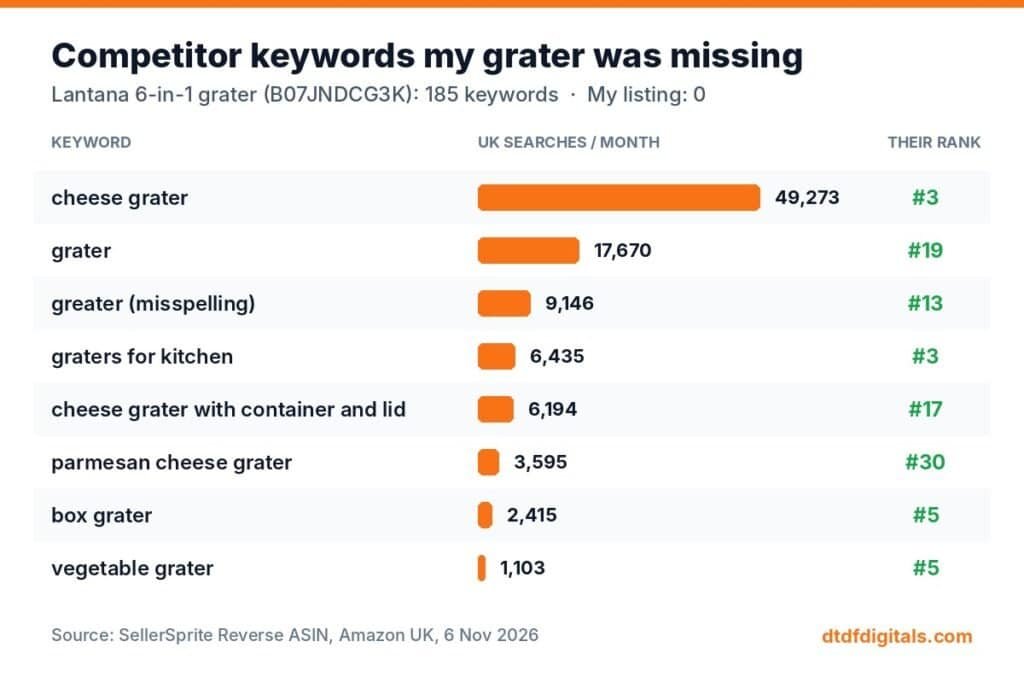
I looked for a grater like mine that sells well. The best match was a 6-in-1 grater with a container from Lantana (ASIN B07JNDCG3K): £13.99, 4.5 stars from over 11,000 ratings, and an estimated 1,200 units a month.
SellerSprite’s Reverse ASIN found 185 keywords for it. Mine had 0. Here’s what they rank for:
| Keyword | UK searches/month | Competitor’s rank |
|---|---|---|
| cheese grater | 49,273 | #3 |
| grater | 17,670 | #19 |
| greater (misspelling) | 9,146 | #13 |
| graters for kitchen | 6,435 | #3 |
| cheese grater with container and lid | 6,194 | #17 |
| parmesan cheese grater | 3,595 | #30 |
| box grater | 2,415 | #5 |
| vegetable grater | 1,103 | #5 |
Step 2: Check the keywords with Keyword Mining
Keyword Mining on “cheese grater” (UK) returned 175 ideas. Three things stood out:
- “graters for kitchen” is up 116%. It’s growing fast, and only 6,435 searches, so it’s easier to rank for than “cheese grater”.
- “box grater” has about a 20% purchase rate. Fewer people search it, but the ones who do are ready to buy.
- “greater” gets 9,146 searches a month. It’s a misspelling, so it can’t go in the title, but it can go in the back-end search terms where shoppers never see it.
Step 3: Rewrite the listing
New title (main keyword first, then the features buyers search for):
DTDF Cheese Grater 6-in-1 with Container – Handheld Box Grater for Kitchen, Coarse, Medium, Fine & Micro Stainless Steel Blades – Parmesan, Vegetable Grater & Lemon Zester
That one title covers cheese grater, grater with container, box grater, graters for kitchen, parmesan, vegetable grater and zester.
Back-end search terms: misspellings (greater, gratter, grator) plus words that don’t fit naturally in the title, like shredder, ginger, garlic, nutmeg, chocolate, potato, carrot and courgette.
Bullet points: rewritten around the container, the non-slip base and being dishwasher safe, using the supporting keywords.
A catch: without Brand Registry, Amazon wouldn’t let me change the title myself. I had to send the new title to Seller Support. The bullets and back-end search terms I could edit directly. If you’re in the same position, read how to check your Amazon UK keywords.
Step 4: Point the ads at the right keywords
A new listing with no sales won’t rank on its own, so I set up two small Sponsored Products campaigns at £3 a day each:
- Auto campaign at a £0.40 default bid, to discover new search terms.
- Manual exact campaign with 5 keywords from SellerSprite: cheese grater (£0.40), graters for kitchen (£0.60), parmesan cheese grater (£0.52), cheese grater with container (£0.35), vegetable grater (£0.46).
Amazon suggested £0.98 for “cheese grater”. SellerSprite’s bid data showed most sellers pay £0.32–£0.46, so I started at £0.40 and will raise it only if I get no impressions.
What this SellerSprite case study cost
- Research time: about 30 minutes in SellerSprite
- Ads: £6 a day maximum across both campaigns
- SellerSprite Standard: $79 a month (35% off with code DTDFUK)
SellerSprite case study results so far
Update, 11 November 2026 (first 6 days). The changes went live on 6 November. Here’s what happened in the first 6 days:
Amazon Ads (Campaign Manager), 6–11 November:
| Campaign | Clicks | Spend | Orders* | Sales* | ACOS |
|---|---|---|---|---|---|
| Manual exact (SellerSprite keywords) | 16 | £7.88 | 3 | £32.97 | 23.9% |
| Auto | 29 | £15.31 | 2 | £21.98 | 69.7% |
| Total | 45 | £23.19 | 5 | £54.95 | 42.2% |
Seller Central (Business Report), 6–11 November:
| Before (to 5 Nov) | 6–11 Nov | |
|---|---|---|
| Sessions (visitors) | 0 | 28 |
| Page views | 0 | 37 |
| Units ordered | 0 | 2 (£21.98) |
| Conversion (unit session %) | – | 7.1% |
| Featured Offer | – | 100% |
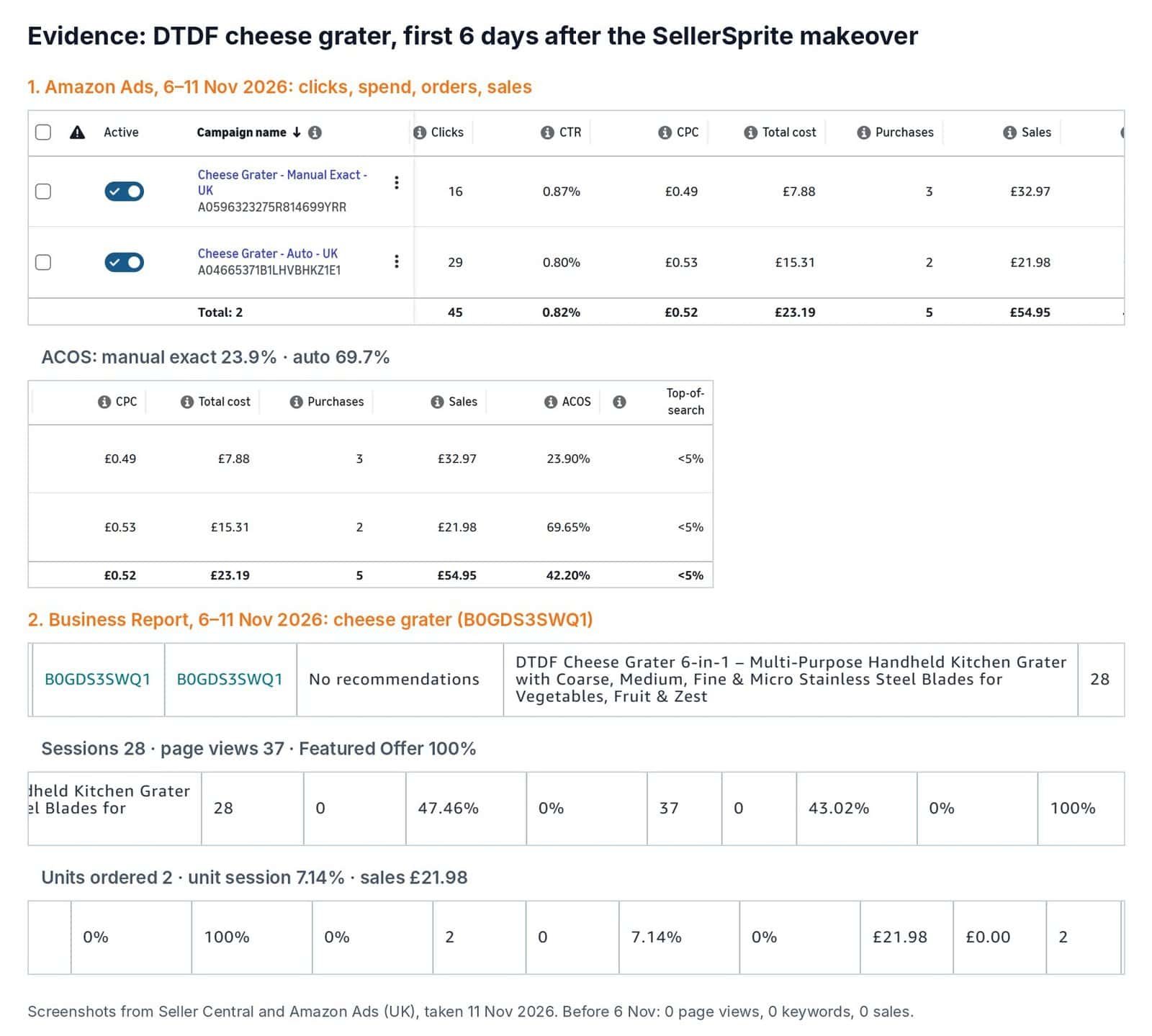
What worked: the manual exact campaign, built on the SellerSprite keywords. It got 16 clicks for £7.88 and 3 orders (£32.97), an ACOS of 23.9%.
What didn’t: the auto campaign. It spent £15.31 for 2 orders (ACOS 69.7%) and kept running out of budget. So I moved money to what’s working: the manual exact budget went up from £3 to £4 a day, and the auto campaign stayed at £3.
It’s early, and 6 days is a small sample. However, the listing went from invisible to selling, and the keywords that SellerSprite found are the ones doing the work. I’ll add the full first-week figures and keyword rankings on 13 November, then a 1-month update.
What you can copy from this SellerSprite case study
- If your listing gets no views, run Reverse ASIN on it. If it shows few or no keywords, that’s your answer.
- Find a competitor with lots of reviews and a similar product, and Reverse ASIN them.
- Pick 1 main keyword for the start of your title and 4–6 supporting ones for bullets.
- Put misspellings in the back-end search terms.
- Run small exact-match ads on the same keywords so Amazon learns where your listing belongs.
Want me to do this for your listing?
Smart Refurbish rewrites Amazon listings around real UK keywords, the same way I did this one. Makeovers from £25, and you upload everything yourself, so I never need your login.
🎁 Reader offer: 35% off SellerSprite
Use code DTDFUK at checkout for 35% off SellerSprite subscriptions. The code must be entered at checkout for the discount to apply.
Data from SellerSprite (Amazon UK), checked 6 November 2026. Search figures change monthly, so treat them as a guide.

Dave is the founder of DTDF Digitals and the owner of DTDF Home & Kitchen, a UK kitchenware brand that has sold over 500 products on its own store and Amazon. He also runs Smart Refurbish, a listing makeover service that gives small Amazon and eBay sellers’ tired listings a second life. He tests AI video, ad and seller tools on his own real products before reviewing them, and shares what each tool produced, what it cost and where it fell short.