Runway AI Review (UK): I Tested Gen-4.5 on My Amazon Products

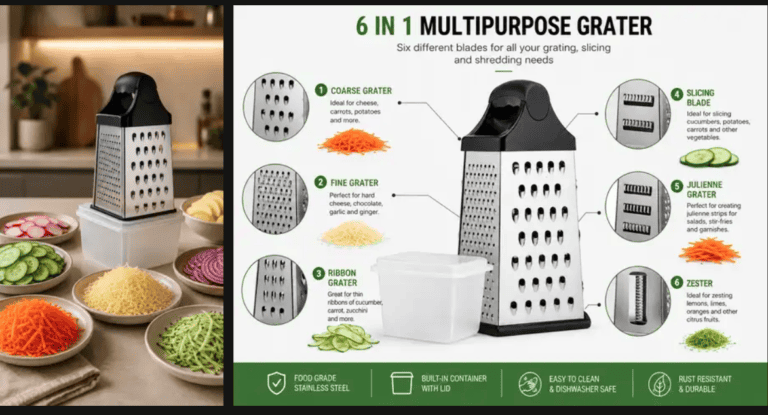
In this Runway AI review, I put one of the best-known AI video generators to a simple test: can it turn a product photo into a video that actually sells? I tested Gen-4 Turbo and Gen-4.5 on two of my own Amazon UK products, a glass washer and a cheese grater, with exactly the same photos and prompts I used in my Tolstoy review. However, not everything worked, so this Runway AI review shows every result, including the misses.
Disclosure: I’m a Runway affiliate partner. Runway gave me 3 months of the Max plan for testing, and I earn $15 if you buy a paid plan with my code. That didn’t change the results below: 5 of my 6 videos failed, and I’ve shown them.
🎁 Reader offer: 25% off Runway
Use code dtdfdigitals25 at checkout for 25% off any Runway plan (new subscribers). The code must be entered at checkout for the discount to apply.
Runway AI review: quick answer
- Best at: realistic hands, lighting and kitchen scenes, and simple actions like grating.
- Weak at: product physics. It couldn’t put a glass over my glass washer in 5 tries.
- Cost: about 25 credits for a 5-second Gen-4 Turbo clip, and about 60 for Gen-4.5.
- Verdict: worth it for social media clips of simple products. Test it before relying on it for “how it works” videos.
What is Runway?
Runway is an AI video platform. You upload a photo (or just type a description), and it generates a short video clip. It has its own models, Gen-4 Turbo (cheaper and faster) and Gen-4.5 (its best), plus models from other companies like Kling and Seedance. There’s also an AI chat agent, but it charges credits for every reply, so I used the video tool directly.
However, the free plan can’t make videos. Every video model needs a paid plan, as I found in my Runway free plan review.
How I tested it
For this Runway AI review, I used Tool → Video, uploaded one product photo, wrote a prompt and set the clip to 5 seconds. I judged every video on two things: does the product still look like mine, and does it do what the product actually does?
Test 1: the glass washer (Gen-4 Turbo)
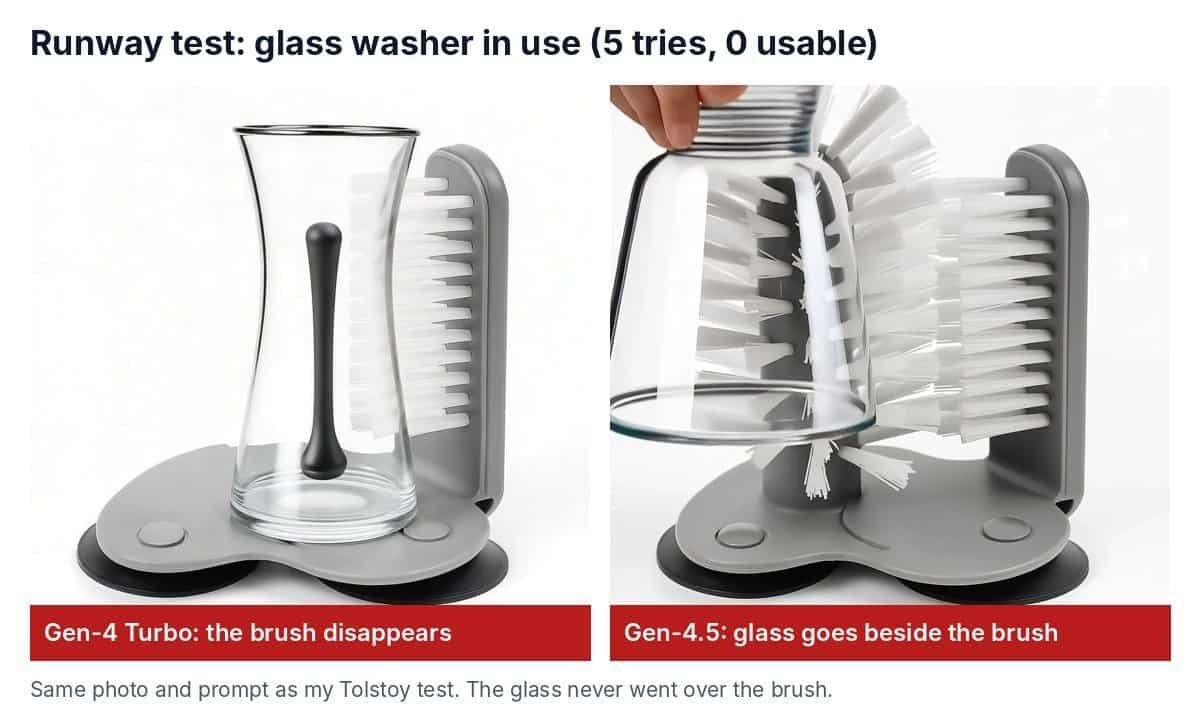
Prompt: a hand lowers a glass upside down over the brush and pushes it down to the base.
Result: the hand and lighting looked real, but the glass turned into a vase shape, and my white brush disappeared and became a black rod. As a result, a video that changes your product can’t be used to sell it. Cost: 25 credits.
Test 2: the glass washer (Gen-4.5)
Next, I switched to Runway’s best model with the same prompt. The Generate button gives no feedback, so I accidentally clicked it 4 times and got 4 videos. Useful, as it turned out.
Result: Gen-4.5 kept the washer’s shape much better, but in all 4 videos the glass went beside the brush, not over it. Some glasses were too short, some drifted sideways. 0 of 4 usable, about 240 credits.
Test 3: the cheese grater Reel (Gen-4.5)
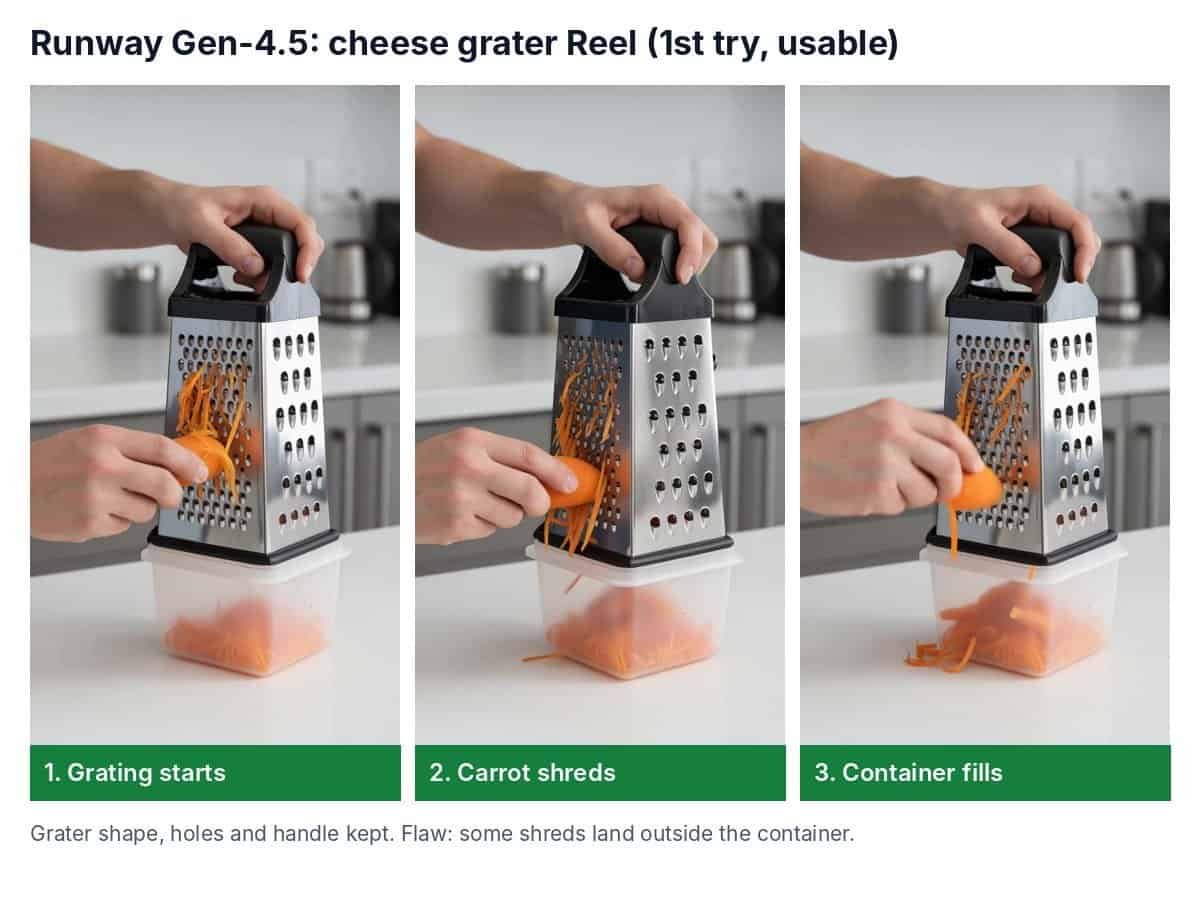
Finally, I asked for a vertical (9:16) clip of a hand grating carrot on my box grater, with the shreds falling into the container.
Result: usable on the first try. The grater kept its shape, holes and black handle, the kitchen looks real, and the container fills up. However, there are flaws: some shreds stick to the outside of the grater and a few land on the worktop, and the motion is a little slow. Even so, I’ll speed it up to 1.5x and post it.
My results in one table
| Test | Model | Tries | Credits | Result |
|---|---|---|---|---|
| Glass washer in use | Gen-4 Turbo | 1 | 25 | ❌ Brush disappeared |
| Glass washer in use | Gen-4.5 | 4 | ~240 | ❌ Glass went beside the brush every time |
| Cheese grater Reel | Gen-4.5 | 1 | ~60 | ✅ Usable (a bit slow) |
Runway vs Tolstoy
I gave Tolstoy the same photos and prompts:
| Runway (Gen-4.5) | Tolstoy | |
|---|---|---|
| Glass washer in use | ❌ 0 of 5 | ✅ 2nd try |
| Cheese grater Reel | ✅ 1st try | ✅ 2nd try |
| Background | Keeps your photo’s background | Builds a new scene (e.g. a sink) |
| Best for | Realistic motion, simple actions | Product-in-use scenes |
In other words, the pattern is clear: AI video tools are good at making things look real, but they struggle with how a product works. Simple actions (grating) work; precise ones (a glass fitting over a brush) often don’t.
Tips if you try Runway
- Use the Tool, not the chat agent. The agent charges credits for every reply.
- Click Generate once and watch the queue on the right. The button doesn’t show that it’s working.
- Pick simple actions: pouring, grating, rotating. Avoid one object fitting precisely inside another.
- Start with Gen-4.5 for products. Turbo is cheaper but changed my product.
- Watch every video at full speed. Still frames can hide problems.
Runway pricing
The free plan gave me some starter credits, but it can’t make videos. Paid plans (per month, billed yearly / monthly):
| Plan | Price | Credits a month | About how many 5-second Gen-4.5 clips |
|---|---|---|---|
| Standard | $12 / ~$15 | 625 | 10 |
| Pro | $28 / ~$35 | 2,250 | 37 |
| Max | $76 / ~$95 | 9,500 | 158 |
Gen-4.5 uses 12 credits per second (60 for a 5-second clip) and Gen-4 Turbo uses 5 (25 for 5 seconds), which matches what I was charged. You can check the latest prices on Runway’s pricing page. Prices are in US dollars; UK buyers may also pay VAT.
With my code dtdfdigitals25, new subscribers get 25% off any plan.
Pros and cons
Pros
- Very realistic hands, lighting and kitchens
- Kept my grater accurate, and Gen-4.5 kept product shapes well
- Fast: a few minutes per clip
- Cheap per clip compared with Tolstoy
- Choice of models in one place
Cons
- Failed my glass washer test 5 times out of 5
- Gen-4 Turbo changed my product
- No video on the free plan
- Easy to waste credits (the agent, and repeat clicks)
Runway AI review verdict: is it worth it for online sellers?
Yes, for social media clips of products with a simple action, like my grater. It made a usable Reel on the first try for about 60 credits. No, not yet, if you need to show exactly how a product works: after 5 tries it still couldn’t put a glass on my glass washer. For that, Tolstoy did better.
So my advice: start on the Standard plan, test your own product with one or two clips, and only scale up if it handles your product’s action.
🎁 Reader offer: 25% off Runway
Use code dtdfdigitals25 at checkout for 25% off any Runway plan (new subscribers). The code must be entered at checkout for the discount to apply.
Tested on 11 November 2026 on the Runway Max plan. AI video tools change quickly, so results and pricing may differ by the time you read this.

Dave is the founder of DTDF Digitals and the owner of DTDF Home & Kitchen, a UK kitchenware brand that has sold over 500 products on its own store and Amazon. He also runs Smart Refurbish, a listing makeover service that gives small Amazon and eBay sellers’ tired listings a second life. He tests AI video, ad and seller tools on his own real products before reviewing them, and shares what each tool produced, what it cost and where it fell short.