How to Use SellerSprite for Amazon UK: Step-by-Step Tutorial (Tested on My Listing)
SellerSprite is an Amazon research tool that shows UK search volumes, competitor keywords and sales estimates. In this SellerSprite tutorial I use it on my own Amazon UK listing, a glass cup washer that I sell as DTDF Essentials, so you can see real results instead of a demo.
Disclosure: SellerSprite gave me two months of their Standard plan to make this tutorial, and I earn a commission if you subscribe with my code. I paid nothing for the tests and the results below are exactly what I got, including the parts that didn’t impress me.
🎁 Reader offer: 35% off SellerSprite
Use code DTDFUK at checkout for 35% off SellerSprite subscriptions. The code must be entered at checkout for the discount to apply.
What you’ll learn in this SellerSprite tutorial
- Set SellerSprite to Amazon UK (and why this matters)
- Find every keyword your own listing ranks for (Reverse ASIN)
- Find the keywords a competitor gets and you don’t (the “keyword gap”)
- Check search volume and pick keywords that actually fit your product (Keyword Mining)
- Write a new title and bullets with the AI Listing Builder
- Use the browser extension on Amazon, and check how accurate its sales estimates are
Step 1: Set SellerSprite to the UK marketplace
First, the most important setting in this SellerSprite tutorial. Every SellerSprite tool has a marketplace selector, and it often starts on the United States. Before you search, switch it to United Kingdom. US numbers can be ten times bigger or smaller than UK numbers for the same phrase, so a keyword that looks great on Amazon.com can be almost dead on Amazon.co.uk.
Tip: if you see “英国” next to an ASIN, that just means “United Kingdom”. You’re on the right marketplace.
Step 2: Reverse ASIN on your own listing
Next, Reverse ASIN. It shows which searches your product appears for, where it ranks, and how many people search each phrase. Simply paste your ASIN into Reverse ASIN with the UK marketplace selected.
For my glass cup washer (ASIN B0FBMLX2JJ) it found 31 keywords. The ones with real UK search volume:
| Keyword | UK searches/month | My organic rank |
|---|---|---|
| bottle washer | 3,878 | 162 |
| cup cleaner | 1,976 | 85 |
| glass washer | 602 | 27 |
I’m in the top 10 for long phrases like “wine glass washer” (#6), but far down on the phrases most people actually search. That tells me what to work on.
Step 3: Find the keyword gap with a competitor
This is the most useful thing SellerSprite did for me. First, run Reverse ASIN on a competitor that sells more than you, then compare their keywords with yours.
I used a similar glass washer from the brand Hniuyun (ASIN B0CBKBJ49G, 91 ratings). SellerSprite found 54 keywords for it, against 31 for mine. Here’s what stood out:
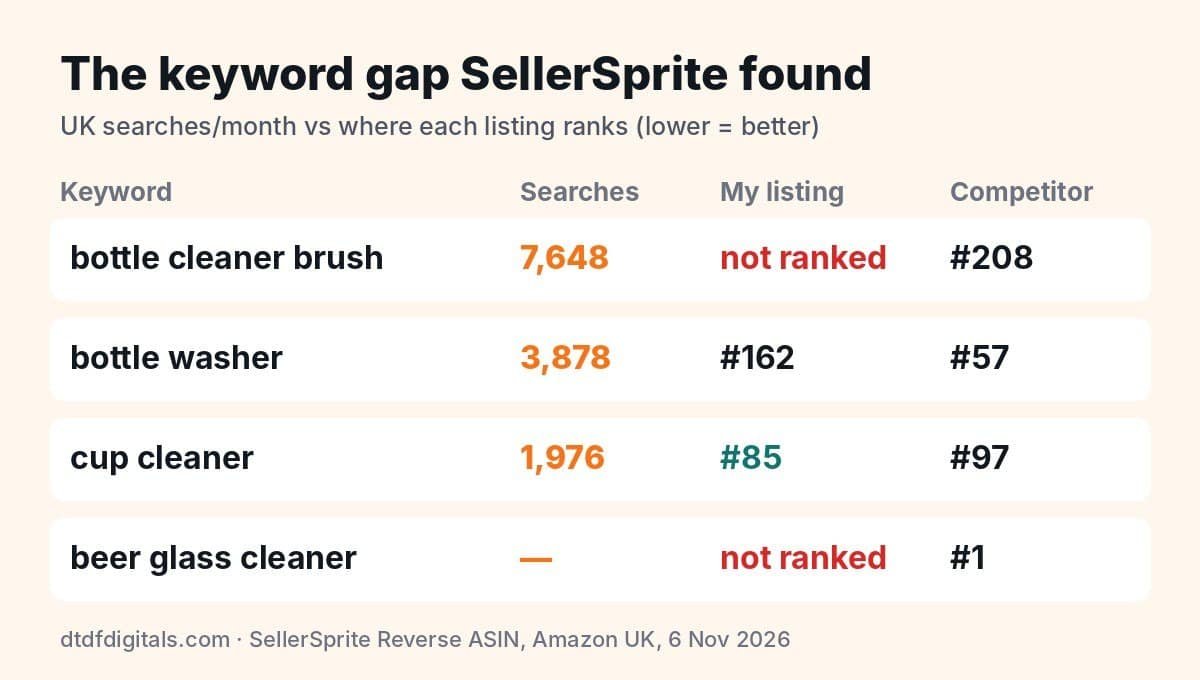
- “bottle cleaner brush”: 7,648 searches a month, growing about 21%. My listing doesn’t appear for it at all. That’s my biggest missed opportunity.
- They rank #1 for “beer glass cleaner” and #6 for “glass washer”.
- For “bottle washer” they’re at #57 and I’m at #162. But for “cup cleaner” I beat them (#85 vs #97).
However, you can’t copy a competitor’s brand name (for example “grownsy bottle washer” showed 1,158 searches, but it’s another brand), so skip brand terms.
Step 4: Check volume and relevance with Keyword Mining
Keyword Mining takes one phrase and shows hundreds of related searches with volumes, trends, purchase rates and suggested ad bids. I searched “bottle cleaner brush” on the UK marketplace and got 277 results.
- “bottle cleaner brush”: 7,648 searches a month, about 12% of searchers buy
- “water bottle brush”: 3,787 (up 12%)
- “bottle cleaning brush”: 3,689 (up 19%)
Watch out for this: “bottle brush” has 62,582 searches a month, which looks amazing. But people searching it mostly want a long handheld brush, not a sink-mounted glass washer. If I chased it, I’d pay for clicks from people who don’t want my product. High volume doesn’t mean it’s the right keyword for you.
Before I used SellerSprite I’d been calling my product a “glass cup brush” in my ads. In Keyword Mining that phrase showed almost no UK searches. I wrote more about that in how to check your Amazon UK keywords.
Step 5: Write a title and bullets with the AI Listing Builder
- Open Listing Builder and paste your chosen keywords, one per line.
- Add your product’s real features in “Product Characteristics”.
- Click Keywords Analysis first. It won’t generate anything until you do.
- Click the AI button next to the title and bullet points.
The Standard plan showed 1,000 AI credits a month, and a title plus five bullets used 2. In about 30 seconds it wrote:
Sink Mounted Glass and Bottle Washer with 3 Suction Cups and Double Sided
Overall, the five bullets were genuinely usable and included “cup cleaner”, “bottle washer”, “mug cleaner” and “glass washer”. But:
- The title was cut off by the 75-character title field, and it left out “cup cleaner” and “bottle cleaner brush”.
- Bullet 5 claimed “premium resilient materials”. I never said that, so I’d delete it. Amazon doesn’t allow claims you can’t back up.
So treat it as a fast first draft. Then put your top keyword at the start of the title and check every claim.
Step 6: Use the extension on Amazon (and how accurate it is)
The SellerSprite browser extension works on Chrome and Edge. After installing it, click its icon and choose “Sync the web account”. Until I did this, sales, revenue and FBA fees showed as **** even though I was logged in on the website.
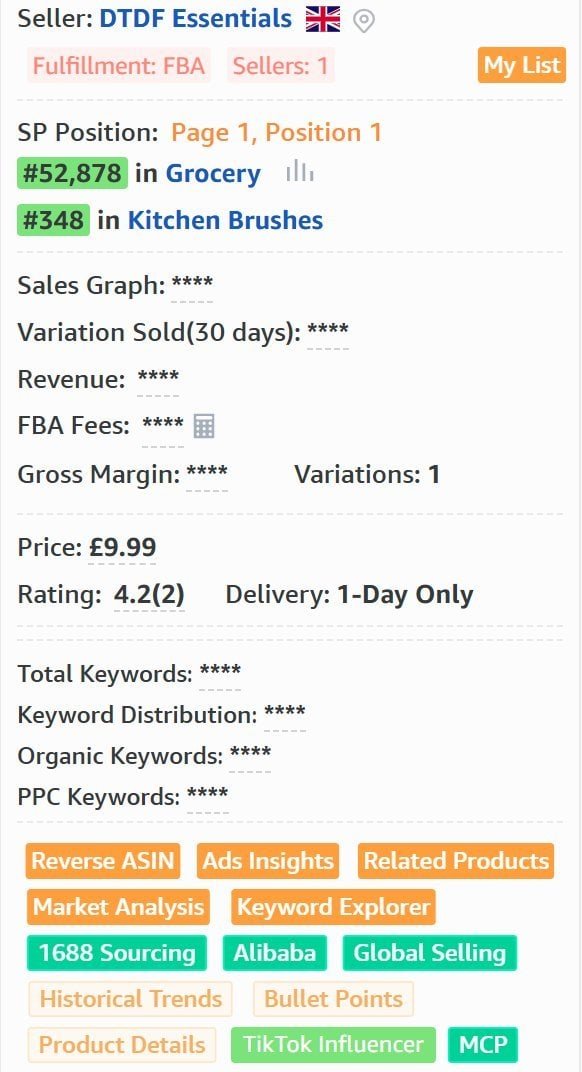
As a result, once synced, every Amazon search shows a panel with monthly units, revenue, sales rank, ratings and price for every product on the page. On my own product page it also showed every seller on the listing, which once helped me spot who had taken my Buy Box on another product.
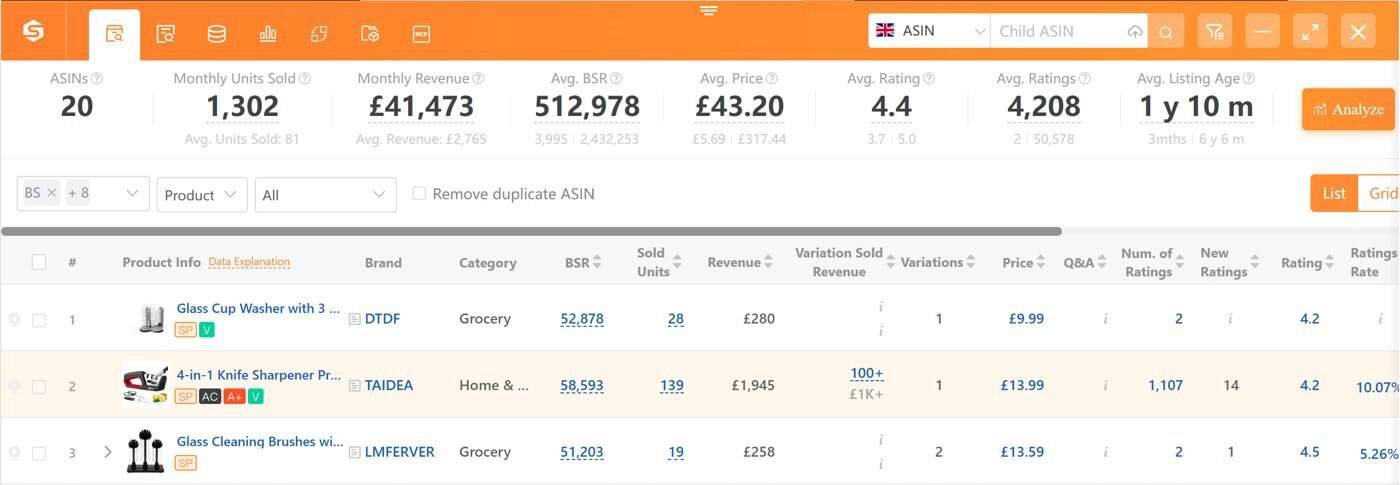
Accuracy test: I compared SellerSprite’s estimate for my glass cup washer with my real Seller Central figures for the same 30 days.
| Last 30 days | SellerSprite estimate | My real figures |
|---|---|---|
| Units sold | 28 | 20 |
| Sales | £280 | £199.80 |
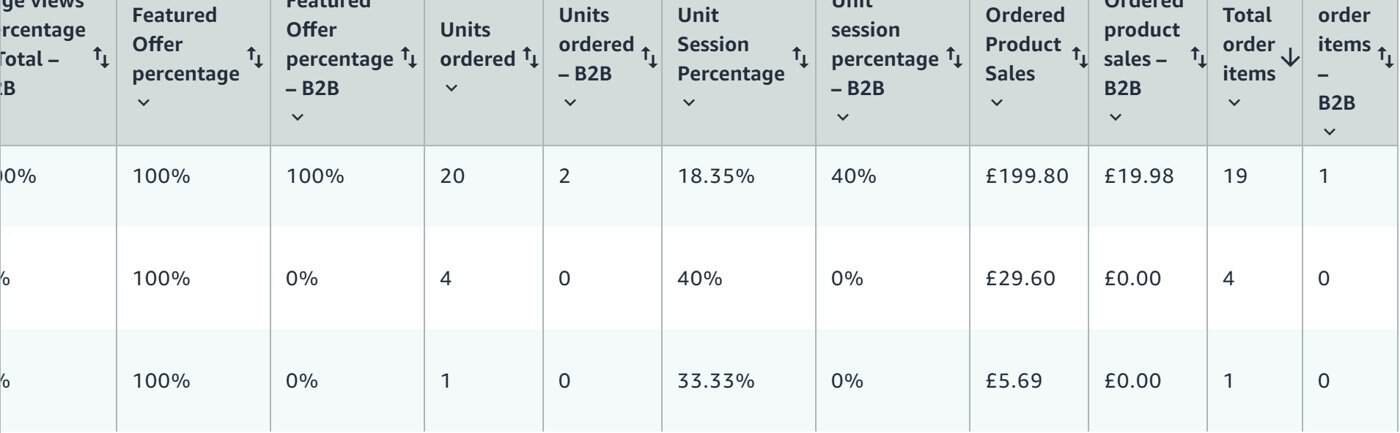
It was in the right range but about 40% too high. In fact, that’s normal for sales estimators, which work from sales rank, not from Amazon’s own data. Use the numbers to compare products and spot which competitors sell well, not as exact figures. The same report showed my listing converts at 18.35%, so my real job is getting more people to see it, which is exactly what the new keywords are for.
SellerSprite tutorial: free vs Standard plan
- Free (not logged in): the extension still shows who’s selling on a listing, its rank and its rating, but sales, revenue, FBA fees and keyword counts are hidden.
- New account: in my first tests on a new account, Reverse ASIN, Keyword Mining, competitor estimates and the Listing Builder all worked.
- Standard plan: full data everywhere, including the extension panel on Amazon searches, plus 1,000 AI credits a month. Standard is $79 a month, or $790 a year. With code DTDFUK you get 35% off.
What this SellerSprite tutorial changed on my listing
- Adding “bottle cleaner brush” and “cup cleaner” to my title and bullets.
- Testing “bottle cleaner brush” as an exact-match keyword in my ads.
- Avoiding “bottle brush” even though it’s huge, because it’s the wrong product.
I’ll update this page with the ranking results. For how SellerSprite compares with other tools, read my Helium 10 vs SellerSprite vs AMZScout test.
SellerSprite tutorial verdict: is it worth it for small UK sellers?
In short, for me, yes. The keyword gap in Step 3 found a 7,648-search phrase I was completely missing, and that’s worth more than a month’s subscription if it turns into a few extra sales a week. It isn’t perfect: sales estimates run high and the AI copy needs editing. But for UK search data at a small seller’s budget, it’s the most useful research tool I’ve tested.
🎁 Reader offer: 35% off SellerSprite
Use code DTDFUK at checkout for 35% off SellerSprite subscriptions. The code must be entered at checkout for the discount to apply.
Tested 4–6 November 2026 on Amazon UK. Prices, plans and search figures change, so check SellerSprite’s site before you buy.

Dave is the founder of DTDF Digitals and the owner of DTDF Home & Kitchen, a UK kitchenware brand that has sold over 500 products on its own store and Amazon. He also runs Smart Refurbish, a listing makeover service that gives small Amazon and eBay sellers’ tired listings a second life. He tests AI video, ad and seller tools on his own real products before reviewing them, and shares what each tool produced, what it cost and where it fell short.