Superscale Review (2026): I Tested the Free Plan on My Own Product
Superscale is an AI ad agent that reads your website, learns your products and creates static and video ads for Meta, Google and TikTok. In this Superscale review, I tested the free plan on my own product from my Amazon UK shop: the DTDF glass cup washer, a double-sided brush that suctions to the sink.
The short version: the ads looked like they came from a professional designer, and the product was accurate in every one. But you can’t download anything on the free plan, and one of the ads included a customer review that Superscale made up.
Disclosure: I used Superscale’s standard free plan and wasn’t given extra credits. I have no affiliate link with Superscale at the time of writing. Some other links on this page are affiliate links, which doesn’t change what I recommend.
Superscale review: quick verdict
| Best for | Sellers who run (or plan to run) Facebook, Instagram, Google or TikTok ads and need lots of ad images |
| Free plan | 300 credits, no card needed |
| Download on free? | No. Downloads need a trial or paid plan |
| Paid from | US$49 a month (Starter) |
| Product accuracy | Excellent, when I uploaded my own photo |
| Biggest catch | It invented a customer review for one ad |
| My rating | 3.5/5 |
What is Superscale?
Superscale works like a small team of AI agents. An “Account Manager” sets up your brand, and a “Graphic Designer” creates the ads. You give it your website, it pulls in your logo and products, and then you ask for ads in plain English. It can also make video ads and connect to Meta, Google, TikTok and Shopify, but those need a paid plan.
How I tested Superscale for this review
For this Superscale review, I signed up with my business email and no card. Setup was five quick questions: my role, where I advertise, my monthly ad spend, my goal and when I want ads live. Meanwhile, it read my shop website and imported my logo and more than ten products, including my grater, knife sharpeners and the glass cup washer.
The glass cup washer was imported without a photo, so I attached my main Amazon product photo. I asked for 7 static ads and told it to keep the real product shape, with white bristles and a grey suction base, and not to add any other brand’s logo.
What the free plan made
About 10 minutes later, I had 7 finished ads, each in a different proven format. Setup and the 7 ads used 214 of my 300 free credits, leaving 86, so the free plan covers one batch like this.
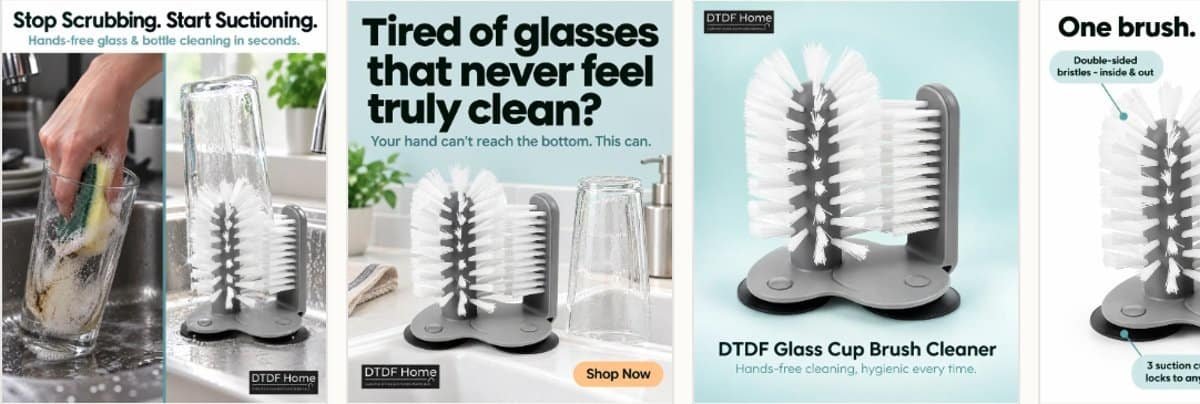
- Before and after: “Stop Scrubbing. Start Suctioning.”
- Problem hook: “Tired of glasses that never feel truly clean?”
- Clean product shot with the product name
- How it works: “One brush”, with labels for the bristles and suction cups
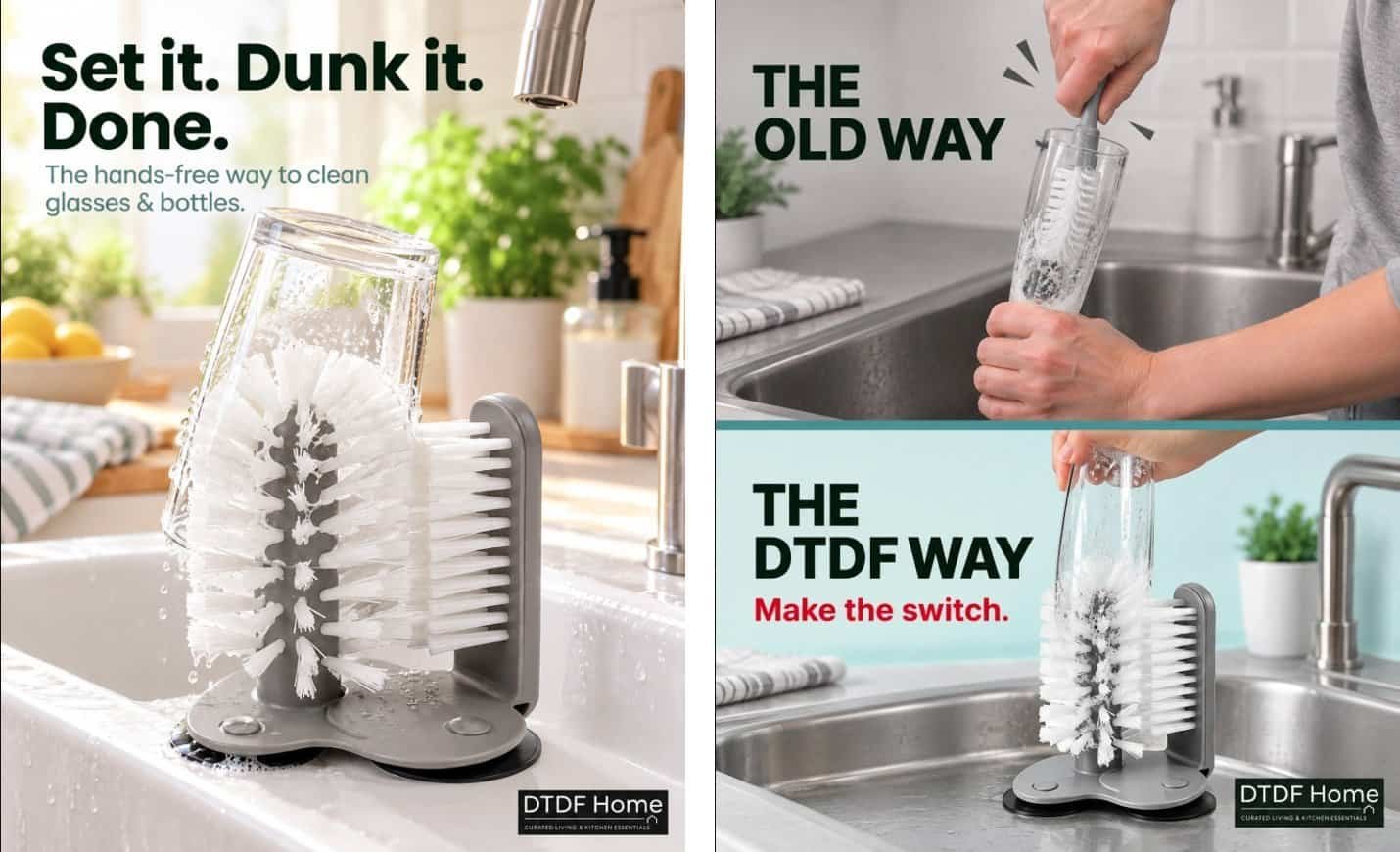
- Lifestyle: “Set it. Dunk it. Done.”
- Comparison: “The old way vs the DTDF way”
- Customer review style: a five-star review from “Jamie H.” (more on this below)
A closer look at the best ads
“Set it. Dunk it. Done.” is the ad I’d run first. It shows a glass pushed down over the brush in a bright kitchen sink, with water splashing off the bristles. The headline is short, and the line underneath, “The hands-free way to clean glasses & bottles”, tells you exactly what the product does. It looks like a real photo shoot.
“The old way vs the DTDF way” splits the image in two. The top half shows someone forcing a long bottle brush into a glass; the bottom half shows the same glass on my brush, with “Make the switch.” in red. Comparison ads like this work well for cleaning products, because shoppers instantly see the problem and the fix.
“One brush. Every glass.” labels the features: double-sided bristles that clean inside and out, a hands-free design, and three suction cups that lock to the sink. This is the most useful format for Amazon shoppers, and it would work well as an extra listing image.
“Tired of glasses that never feel truly clean?” opens with a question, then answers it: “Your hand can’t reach the bottom. This can.” It’s a classic problem-and-solution hook, and it included a “Shop Now” button, ready for a Facebook or Instagram ad.
Under each ad, Superscale lists its “Creative Rationale”, with notes such as “Before/after is the clearest proof”, “Competitor gap” and “Matches real pain points”. If you’ve never run social ads, these notes are almost a free lesson in why certain formats sell.
What worked well
- The product was accurate in every ad. The white bristles, grey suction base and double-sided shape all matched my photo. That’s better than several AI tools I’ve tested.
- The ads look professional. Strong headlines, clean layouts and my “DTDF Home” logo on each one.
- It explains each ad. Every design comes with a “Creative Rationale”, such as why a before-and-after works for a cleaning product. That’s useful if you’re new to ads.
- It learned my shop in minutes from my website alone.
- No card needed to try it.
What could be better
- It made up a customer review. One ad shows a five-star “Verified Purchase” review from “Jamie H.”, who isn’t a real customer of mine. In the UK, fake reviews are illegal under the Digital Markets, Competition and Consumers Act 2024, and Amazon and Meta ban them. Never run an ad like that unless the review is real and you have permission to use it.
- You can’t download on the free plan. To save any ad, you have to start a 5-day trial, which goes through checkout and becomes a paid plan unless you cancel.
- Only 3 of the 7 ads opened full size on the free plan. The rest showed “More creatives locked”.
- No video on the free plan. 300 credits covers about 10 static ads, but a video starts at 500 credits.
- It’s built for Meta, Google and TikTok ads, not Amazon listings. Amazon sellers can still use the images on social media or as extra listing images.
Superscale review: pricing and plans
| Plan | Price | Credits a month |
|---|---|---|
| Free | US$0 | 300 (one-off), no downloads |
| Starter | US$49/month | 4,000 |
| Advanced | US$99/month | 8,000 |
| Pro | US$199/month | 16,000 |
A static ad costs about 30 credits and a video ad starts at 500. Prices are from Superscale’s app and its official plans page in October 2026, before tax. Check the current prices before you buy.
Superscale vs other AI ad tools I’ve tested
| Tool | Best at | Product accuracy | Free download? |
|---|---|---|---|
| Superscale | Static ad designs | Excellent | No |
| AdsTurbo | Lifestyle images and video | Mixed | No |
| HeyGen | AI presenter videos | Excellent (uses your photo) | Yes, watermarked |
| Creatify | Video ads from a product link | Very good | Free plan too small |
See the full results in my AI video tools comparison, my HeyGen review and my guide to why AI gets your product wrong.
Superscale review: who it’s best for
- Sellers who already run Facebook, Instagram or TikTok ads and need fresh designs every week
- Shops with a website Superscale can read to learn their products
- Anyone who wants to see professional ad ideas before paying a designer
It’s less suited to sellers on a tight budget who just want a few free images to download. For that, try HeyGen or the free image tools in my comparison.
Superscale review: tips if you try it
- Upload your own product photo. My glass cup washer was imported without an image. Adding my real photo is why every ad got the product right. Without it, AI tools tend to guess, and guess wrong.
- Tell it what not to do. I asked it to keep the product’s shape and not add other brands’ logos, and it followed both instructions. Add “no customer reviews or testimonials” too, unless you have real ones to give it.
- Check every claim. Make sure each headline and label matches your listing. If your product isn’t “hygienic every time” or “dishwasher safe”, don’t let an ad say so.
- Use your free credits on one product. 300 credits is about one batch of 7 ads, so pick your best seller.
- Plan before you start the trial. The 5-day trial gives you 1,000 credits and unlocks downloads. Have your products and ideas ready, download everything you want, and cancel before day 5 if you don’t want to pay.
Is the Superscale trial worth it?
If you already spend money on Facebook or Instagram ads, my Superscale review says probably yes. Fresh designs are one of the biggest costs for small shops, and Superscale made seven different, polished ads in ten minutes. Starter, at US$49 a month, gives 4,000 credits, which is roughly 130 static ads at the cost I saw.
If you only sell on Amazon and don’t run social ads, it’s harder to justify. You’d mostly be paying for extra listing images, and there are cheaper ways to get those. In that case, try the free plan to see the quality, then decide.
FAQs
Is Superscale free?
There’s a free plan with 300 credits and no card needed. You can create ads, but you can’t download them without starting a trial or paying.
Does the Superscale free trial charge you?
The 5-day trial goes through checkout and turns into the paid plan you chose unless you cancel before it ends. Set a reminder if you start one.
Can I use Superscale ads on Amazon?
You can use the lifestyle and comparison images as extra listing images, as long as they show your product accurately. Amazon’s main image must still be a real photo on a white background, and you must not use made-up reviews.
Does Superscale make video ads?
Yes, on paid plans. Video ads start at 500 credits, which is more than the free plan gives you.
Superscale review: final verdict
Superscale made the most polished static ads I’ve tested so far, and it got my product right every time. But the free plan is really a demo: you can look but not download, and one ad came with an invented customer review that you must not use.
After this Superscale review, my advice is simple: if you run social ads regularly and want a steady stream of designs, Superscale is worth a trial. Just check every ad for made-up reviews or claims before you publish it.

Dave is the founder of DTDF Digitals and the owner of DTDF Home & Kitchen, a UK kitchenware brand that has sold over 500 products on its own store and Amazon. He also runs Smart Refurbish, a listing makeover service that gives small Amazon and eBay sellers’ tired listings a second life. He tests AI video, ad and seller tools on his own real products before reviewing them, and shares what each tool produced, what it cost and where it fell short.