InVideo AI Review (2026): I Tested the Free Plan on My Own Products
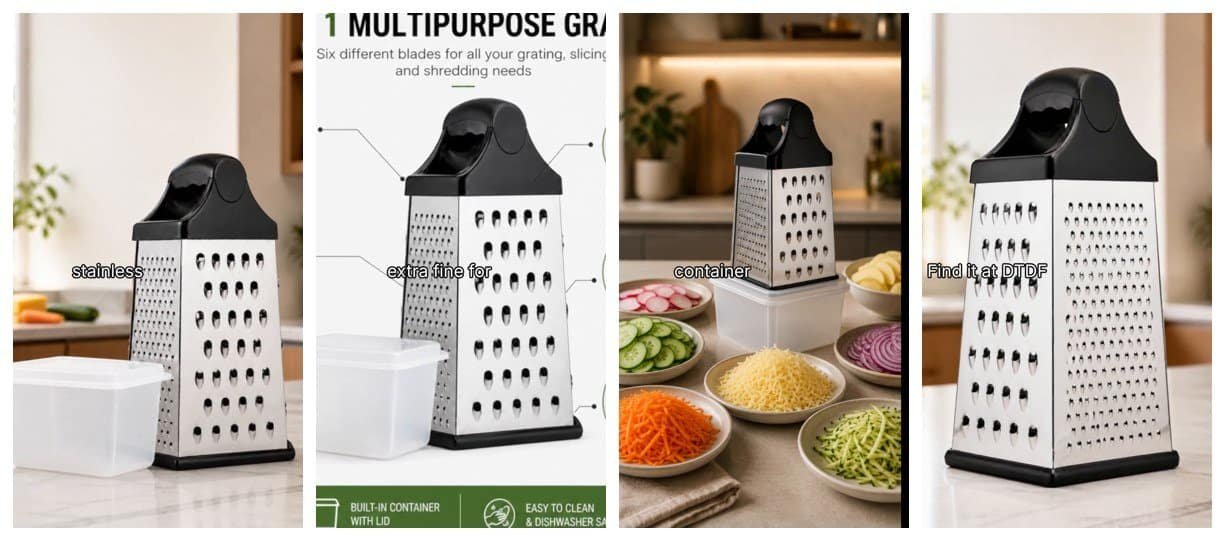
In this InVideo AI review, I test the tool the way a small online seller would: on my own products, starting on the free plan. I sell kitchen products on Amazon UK and eBay, and I wanted to know two things. Can InVideo turn my product photos into a usable video ad? And how far does the free plan really go?
Short answer: InVideo is good at turning photos and a script into a tidy slideshow-style video with a voiceover. But on the free plan, I could not make a real AI video clip of my product, and the paid plans now start at $20 a month.
Disclosure: I am an InVideo affiliate. If you sign up through my link, I may earn a commission at no extra cost to you. This review is based only on my own tests.
InVideo AI review: quick answer
- Free plan: 50 credits, no card needed.
- What worked: in an earlier test, it turned my cheese grater photos into a 35-second vertical video with a voiceover and captions.
- What did not: 50 free credits were not enough for even a 5-second AI video clip of my glass cup brush, even with the cheapest model. It asked me to upgrade.
- No cost shown first: InVideo did not tell me the credit cost before I clicked Generate.
- Cheapest paid plan: Starter at $20 a month (400 credits). The better video models need Plus at $60 a month.
- Best for: sellers who want quick photo-plus-voiceover videos and are happy to pay monthly.
What is InVideo AI?
InVideo is an online video maker with an AI “agent”. You type what you want, add your photos, and it plans and builds the video. It also has a free Timeline Editor, ready-made templates such as Product Ads and AI shorts, and a long list of AI models for images, video, music and audio.
When I tested it in October 2026, the video model list was huge: around 40 options, including Seedance 2.5, Kling 3.0, Veo 3.1 Fast, Runway Gen-4.5, MiniMax H3, Gemini Omni Flash and PixVerse. Having them all in one account is a real plus, if you are paying.
Test 1: my cheese grater (photos to video)
In my first test, I gave InVideo four photos of my 6-in-1 cheese grater and asked for a short product video. It made a 35-second vertical (9:16) video in full HD, with a voiceover and captions.
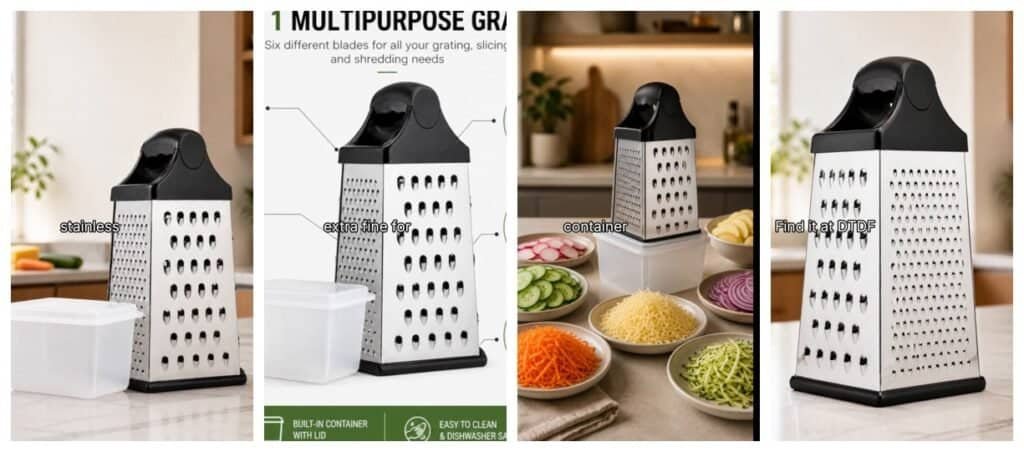
What I liked: it looked clean and showed my real product, because it used my own photos. The voiceover and captions were done for me.
What I did not like:
- It is really a slideshow. The camera zooms and pans over still photos; nothing in the scene moves.
- My infographic photo was cropped, so the heading and side labels were cut off.
- The captions were small and sat over the product.
- The AI agent used up all my free credits along the way, partly by checking its own work.
Test 2: my glass cup brush (AI video clip)
Next, I tried to make a short AI video clip, the same test I ran on Reeporter AI. My free plan showed 50 credits.
First I tried the Product Ads template. It does not let you upload product photos at all; you only type a topic, so the video would not show your real product.
So I created a project, uploaded three photos of my brush, and chose the Gemini Omni Flash model in “Reference to Video” mode (the same model Reeporter picked for my brush). I set 5 seconds, vertical 9:16, and added my prompt.
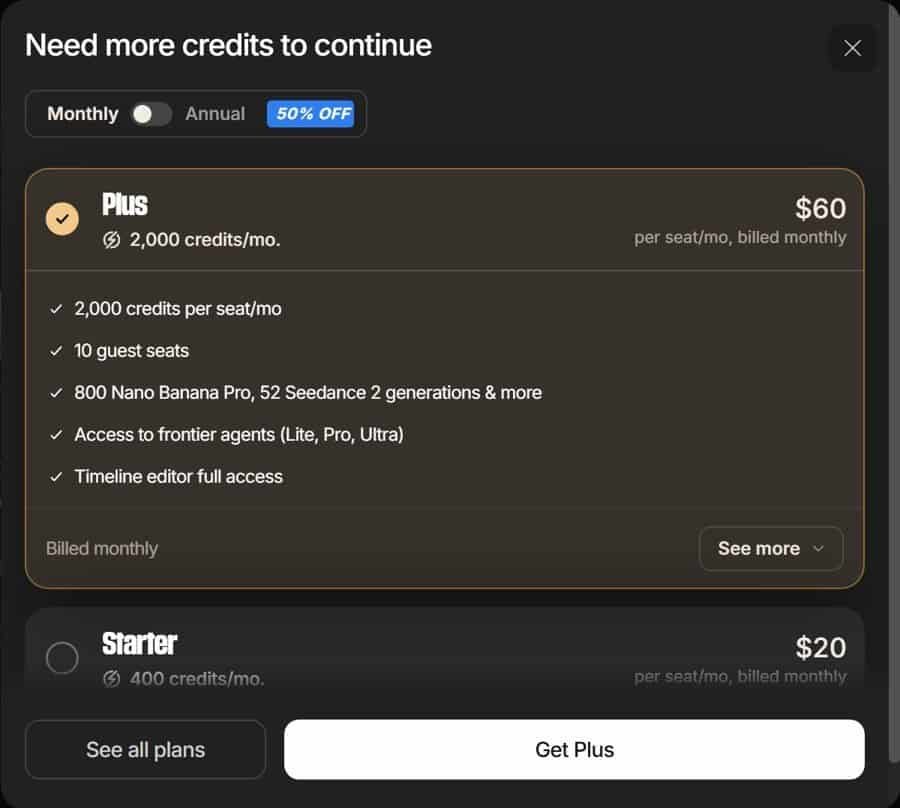
InVideo did not show the credit cost before generating. When I clicked Generate, it showed “Need more credits to continue” and offered the Plus plan at $60 a month or Starter at $20.
To be fair, I then tried InVideo’s cheapest video model, P-Video (“fast, affordable”), with one photo as the start frame. I got exactly the same “Need more credits” message. So on the free plan, I could not make any AI video clip at all.
For comparison, Reeporter showed me the cost up front (15 credits for 10 seconds) and made a realistic clip of my brush.
InVideo pricing (October 2026)
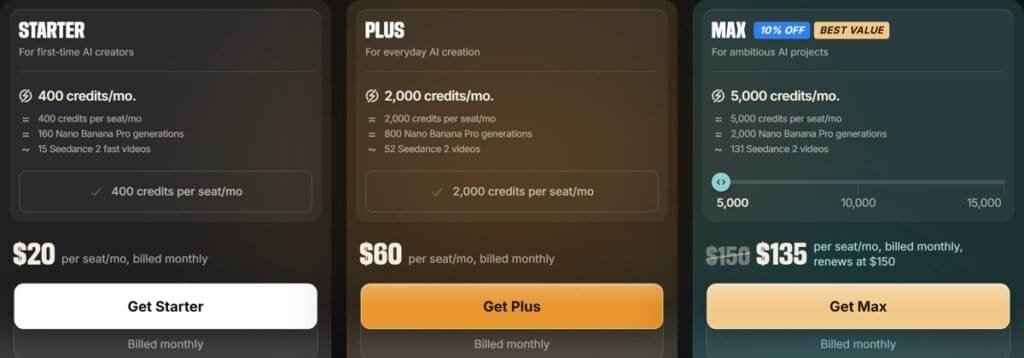
| Plan | Price (monthly) | Credits | Video |
|---|---|---|---|
| Free | $0, no card | 50 | Not enough for an AI clip in my test |
| Starter | $20 | 400 a month | About 15 Seedance 2 fast videos. Basic agent only; no Seedance 2.5 |
| Plus | $60 | 2,000 a month | About 52 Seedance 2 videos. All agents, Seedance 2.5 in 1080p |
| Max | $135 first month, then $150 | 5,000 a month | About 131 Seedance 2 videos |
Annual plans were 50% off when I checked. Video counts are InVideo’s own estimates. Prices have changed several times this year, so check InVideo’s pricing page before you pay.
InVideo AI review: pros and cons
Pros
- Turns your own photos and a script into a finished video with voiceover and captions.
- Free Timeline Editor for basic edits.
- Around 40 AI video models in one account on paid plans.
- Full HD vertical export, ready for Reels, TikTok and Shorts.
Cons
- The free plan could not make an AI video clip in my test.
- No credit cost shown before you generate.
- The AI agent can use up credits checking its own work.
- Product Ads template does not use your product photos.
- Photo videos are slideshows, not real motion.
- Starter is $20 a month, and the better video models need $60.
Who should use InVideo?
Try it if you want quick, tidy photo-plus-voiceover videos for social media and you will use it every week, so a monthly plan makes sense.
Look elsewhere if you want a realistic AI clip of your product without a subscription. In my tests, Reeporter made a better brush video from a one-off $14.90 pack, and PixVerse is still the best free option for short clips. See my guide to the best AI video tools for online sellers.
FAQs
Is InVideo AI free?
There is a free plan with 50 credits and no card. In my October 2026 test, that was not enough to make a 5-second AI video clip.
How much does InVideo cost?
Starter is $20 a month for 400 credits, Plus is $60 for 2,000 credits, and Max is $135 for the first month then $150. Annual plans were 50% off when I checked.
Can InVideo use my own product photos?
Yes, in the main agent and in a project, but not in the Product Ads template, which only takes a text topic.
Does InVideo show the cost before generating?
Not in my test. I only found out the free credits were not enough after clicking Generate.
InVideo AI review: my verdict
InVideo is a capable tool with a huge choice of AI models, and it does a decent job of turning product photos into a simple video with a voiceover. But the free plan is too small for real AI video, the costs are not shown up front, and the useful plans are expensive for a small seller.
If you already make videos every week, InVideo can be worth testing for a month. If you just need a few good product clips, I would start with a cheaper one-off option first.
You can try it at invideo.io.