I Tested Whether AI Video Keeps Product Label Text. The Cheaper Model Won.
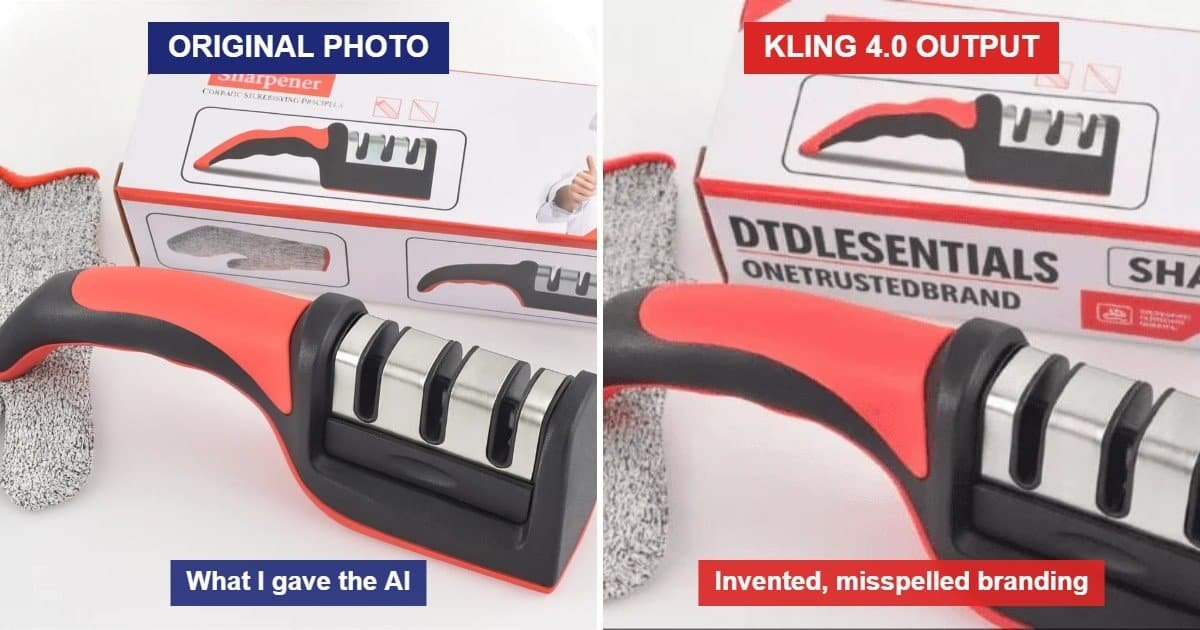
In my Kling AI product video test, the cheapest model kept my product’s label text intact. Its most expensive one invented new branding, and misspelled it.
The test came from a comment on my LinkedIn post about my Clico free plan review. Louis Chi, founder of RefVid, asked whether AI tools keep the exact label text from a product photo, or whether the small print comes out garbled once the image becomes a video. He added that a slow camera push-in holds text better than a turntable spin.
For anyone selling online, this matters. A video that misspells your brand on the box can’t go on a listing, and you won’t spot it unless you zoom in frame by frame. So I tested it on one of my own products.
How I set up the Kling AI product video test
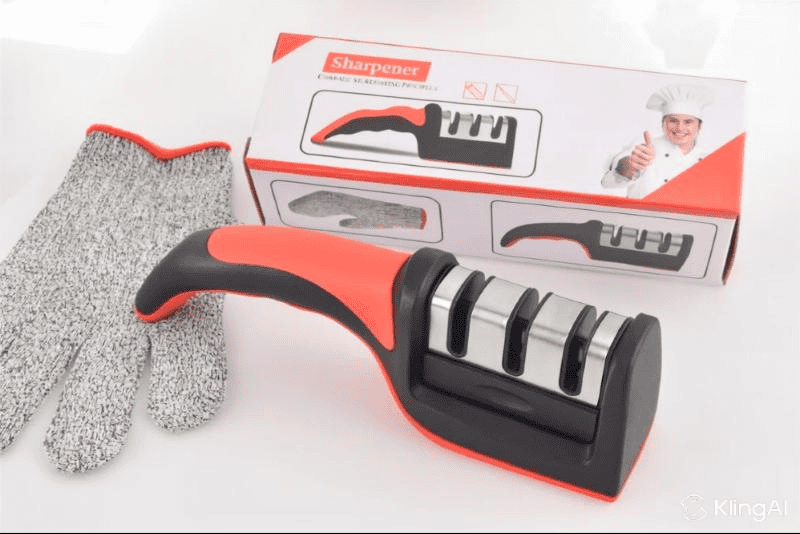
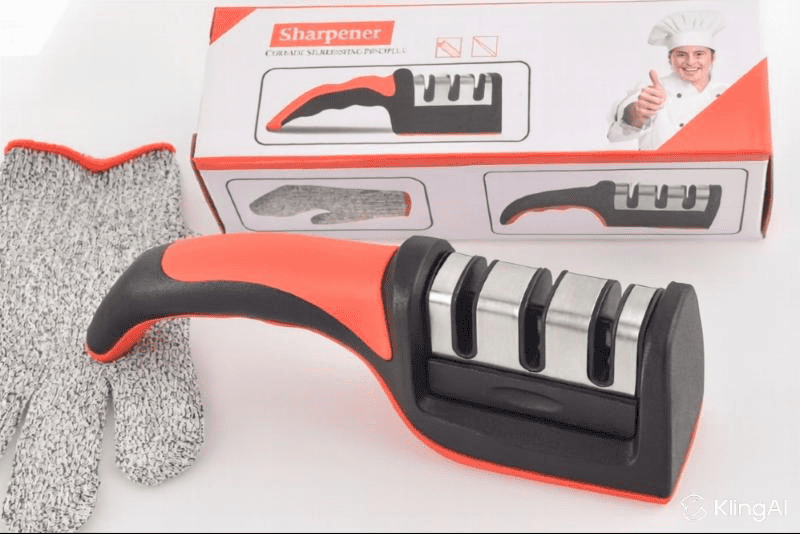
I used one photo of a three-stage knife sharpener with its box and a cut-resistant glove. The box has text at three sizes: a bold “Sharpener” label, a line of tiny print under it, and small icons. The tiny print was already garbled in the source photo, so I scored the video against the photo as it was, not against what the box should say.
- Tool: Kling AI, free plan, through its built-in creative assistant
- Clip: 5 seconds, 16:9, 720p, no audio
- Camera: a slow, steady push-in, following Louis’s tip. The product, box and glove stay still, with no rotation and no hands.
- Models: Kling 2.5 Turbo, then Kling 4.0, the top model, with the same photo and the same brief
To check the text in each Kling AI product video, I paused the clip at the start (0s), 1s, the middle (2.5s) and the end (5s), then zoomed in on the box. A glance at full speed hides most text problems.
Test 1: Kling 2.5 Turbo (15 credits)
Kling 2.5 Turbo kept the packaging exactly as it was for all 5 seconds. The “Sharpener” label kept its font, colour and spelling from the first frame to the last. The tiny print stayed the same gibberish it was in the photo, with only a slight shimmer between frames. Also, nothing was added and nothing went missing.
As a result, Louis’s tip held up. The slow push-in moved the camera without making the model redraw the lettering in a new way each frame.
One detail turned out to matter later. My prompt asked the model to keep “DTDF ESSENTIALS” and “ONE TRUSTED BRAND” on the box. That text wasn’t in this photo, and Kling 2.5 Turbo ignored the request rather than inventing it.
Test 2: Kling 4.0 (50 credits)
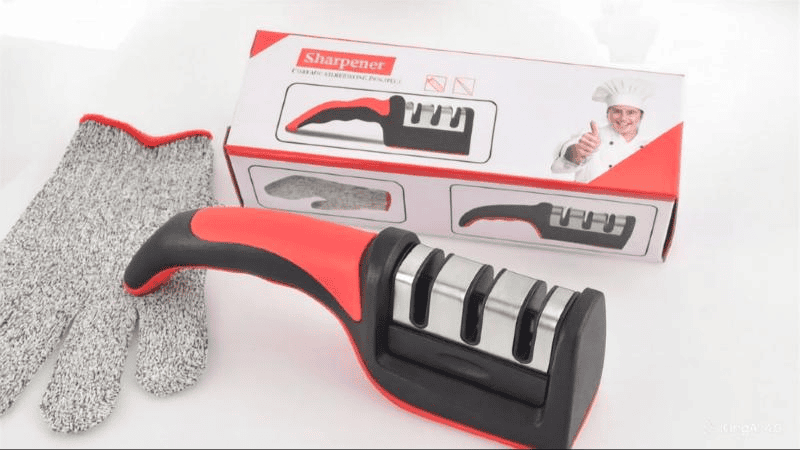
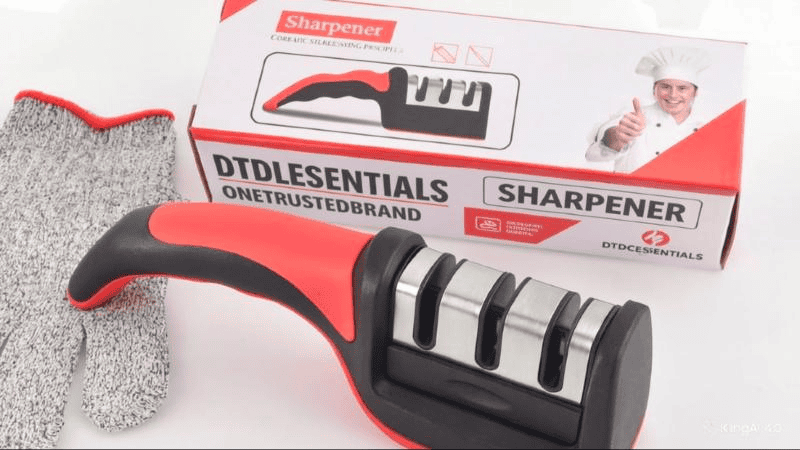
Kling 4.0 painted new branding onto the box within the first second, all of it misspelled. It used the same photo and the same push-in, and I repeated the request to keep “DTDF ESSENTIALS”, “ONE TRUSTED BRAND” and the corner logo. The photo has none of that text. I had added it to a later version of the image, then uploaded the earlier version to Kling by mistake.
However, Kling 4.0 didn’t flag the mismatch. Instead, it created the text. Over the sharpener illustration on the lower panel of the box, it painted:
- “DTDLESENTIALS”
- “ONETRUSTEDBRAND”
- a new “SHARPENER” panel in bold capitals
- a “DTDCESSENTIALS” logo with an invented icon
The new text appeared between 0s and 1s, then stayed perfectly stable to the end of the clip. So the push-in still did its job. It held the wrong text just as steadily as the right text.
Meanwhile, the original top label, the chef photo and the tiny print were left alone. Only the area the prompt pointed at was rewritten.
The accident turned out to be the most useful part of the test. A stronger model follows your words more closely, including words that don’t match your photo.
Kling AI product video results side by side
| Check | Kling 2.5 Turbo | Kling 4.0 |
|---|---|---|
| Credits per 5s clip | 15 | 50 |
| Main “Sharpener” label | Unchanged throughout | Unchanged throughout |
| Tiny print | Same gibberish as the photo, slight shimmer | Same gibberish as the photo, slight shimmer |
| Text added that wasn’t in the photo | None | 4 invented, misspelled text elements |
| Text stable during the push-in | Yes | Yes, including the invented text |
| Usable on a listing | Yes | No |
What to do if your product has text on it
- Only name text that’s actually in your photo. Describe the motion and lighting, and say “keep the packaging unchanged”. Don’t list brand words the image doesn’t show, or a capable model may paint them in.
- Check you’re uploading the final version of the image. Mine was an earlier copy without the branding, and nothing in the tool warned me. More photo fixes are in why AI gets your product wrong.
- Use a slow push-in for labels. Keep the product still and move the camera, light or background instead. Louis’s tip held for both models.
- Start with the cheaper model. For a faithful product clip, Kling 2.5 Turbo did better than Kling 4.0 at under a third of the credits.
- Zoom in on frames before you publish. Check the start, 1 second in, the middle and the end. Invented text in my test appeared in the first second, so a quick watch at full speed would miss it.
Verdict
For a Kling AI product video where the label has to stay right, the slow push-in works, and the bigger model isn’t automatically the safer choice. Kling 2.5 Turbo gave me a usable clip for 15 credits. Kling 4.0 spent 50 credits rewriting my box.
This is one product, one photo and one clip per model, so treat it as a warning sign, not a benchmark. Next I’ll rerun both models with the final branded image, to see whether Kling 4.0 keeps real branding as well as it keeps the text it invents. For more tools I’ve tested on my own listings, see my guide to the best AI video tools for small online sellers.
Thanks to Louis Chi, founder of RefVid, whose comment set up this test and whose push-in tip held for both models.

Dave is the founder of DTDF Digitals and the owner of DTDF Home & Kitchen, a UK kitchenware brand that has sold over 500 products on its own store and Amazon. He also runs Smart Refurbish, a listing makeover service that gives small Amazon and eBay sellers’ tired listings a second life. He tests AI video, ad and seller tools on his own real products before reviewing them, and shares what each tool produced, what it cost and where it fell short.